March 2, 2026 · Gaurav Radadiya
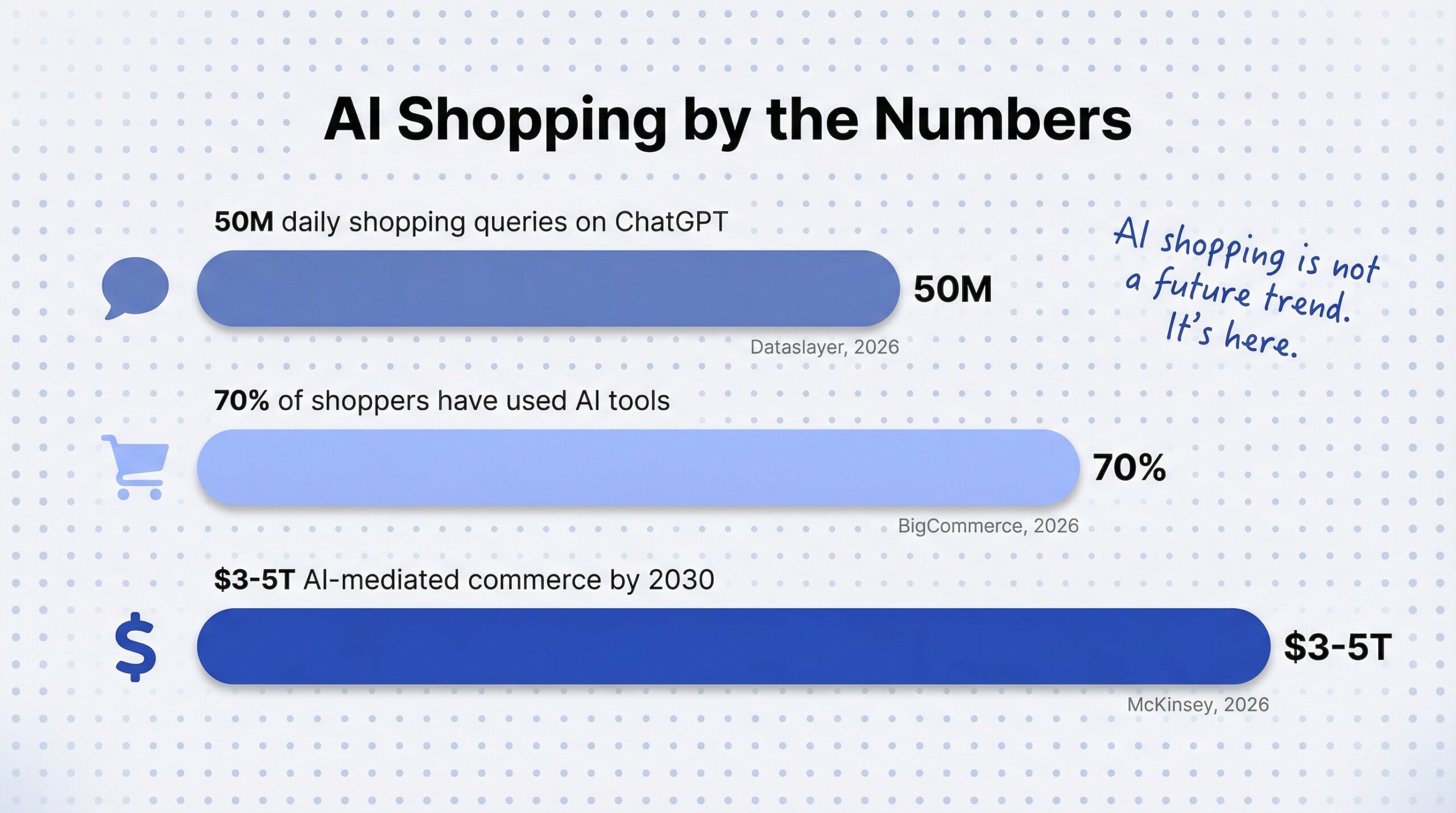
ChatGPT processes roughly 50 million shopping queries every day (Dataslayer, 2026). And as of January 2026, your Shopify products can appear directly inside those conversations.
Shopify agentic commerce puts your catalog in front of customers on ChatGPT, Perplexity, Google AI Mode, and Microsoft Copilot through a feature called agentic storefronts. Customers can browse, compare, and buy without ever visiting your store. It is genuinely a big deal.
But here is the part nobody is talking about: what happens when an AI agent recommends your product and it is out of stock?
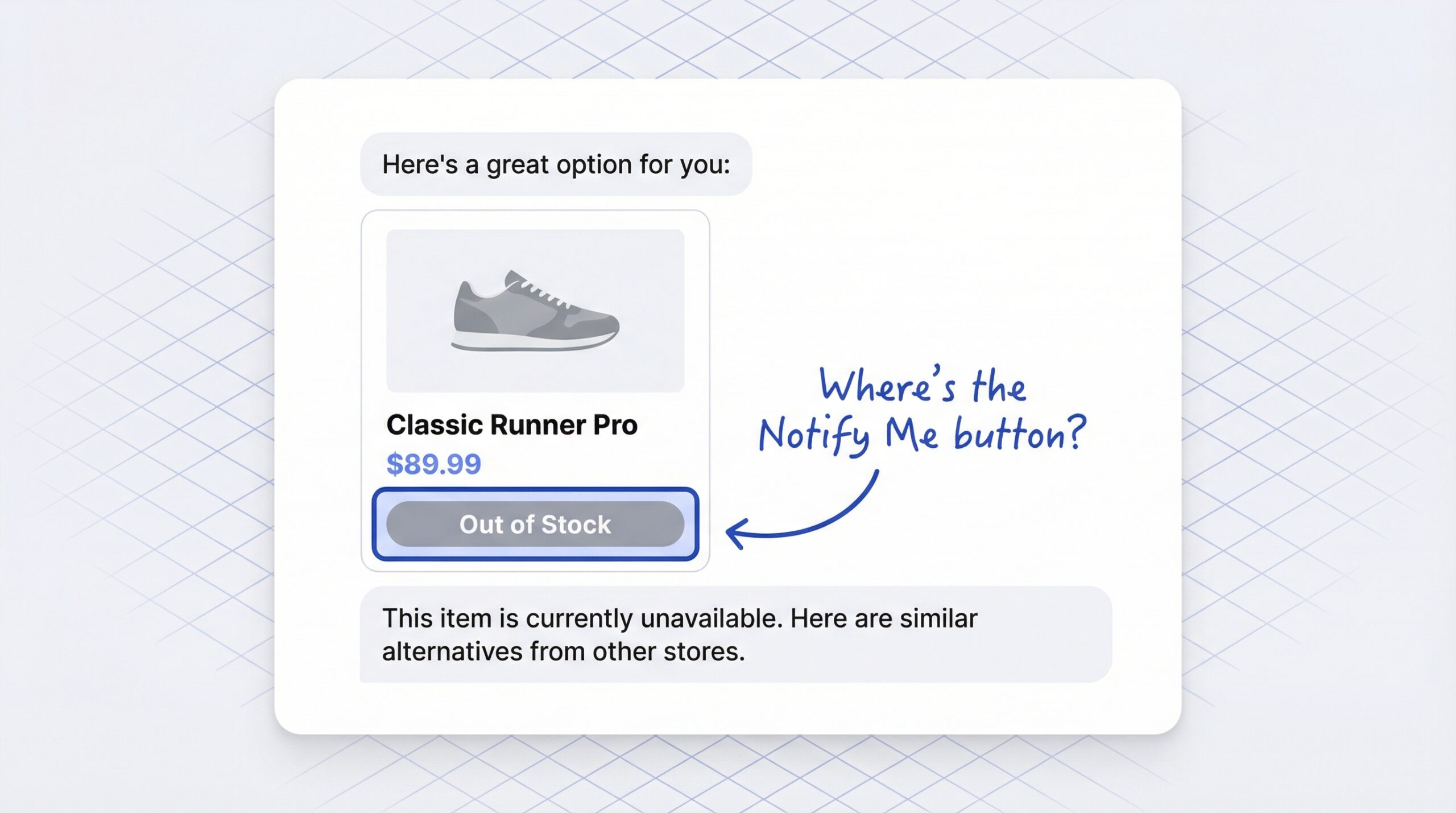
On your Shopify store, customers click “Notify Me” and you capture their email. In AI chat, there is no “Notify Me” button. No email capture. No waitlist. The customer gets told the item is unavailable, the AI suggests a competitor’s product, and you never even know that person existed.
This article breaks down how Shopify agentic commerce handles out-of-stock products, why it matters, and what you can do about it right now.
Shopify agentic storefronts use Shopify Catalog to syndicate your product data to AI platforms. Shopify Catalog takes your product titles, descriptions, images, prices, variant options, and real-time inventory levels, then structures them so AI agents can parse and understand the information.
Here is what that means in practice:
The feature launched as part of Shopify’s Winter ’26 Edition in January 2026. This Shopify ChatGPT integration (and the equivalent connections for Perplexity, Google, and Copilot) is active by default for eligible stores. Merchants can toggle individual AI platforms on or off from the Shopify admin under Settings > Sales channels.
You do not need to build custom integrations. Shopify Catalog handles the data formatting and syndication automatically.
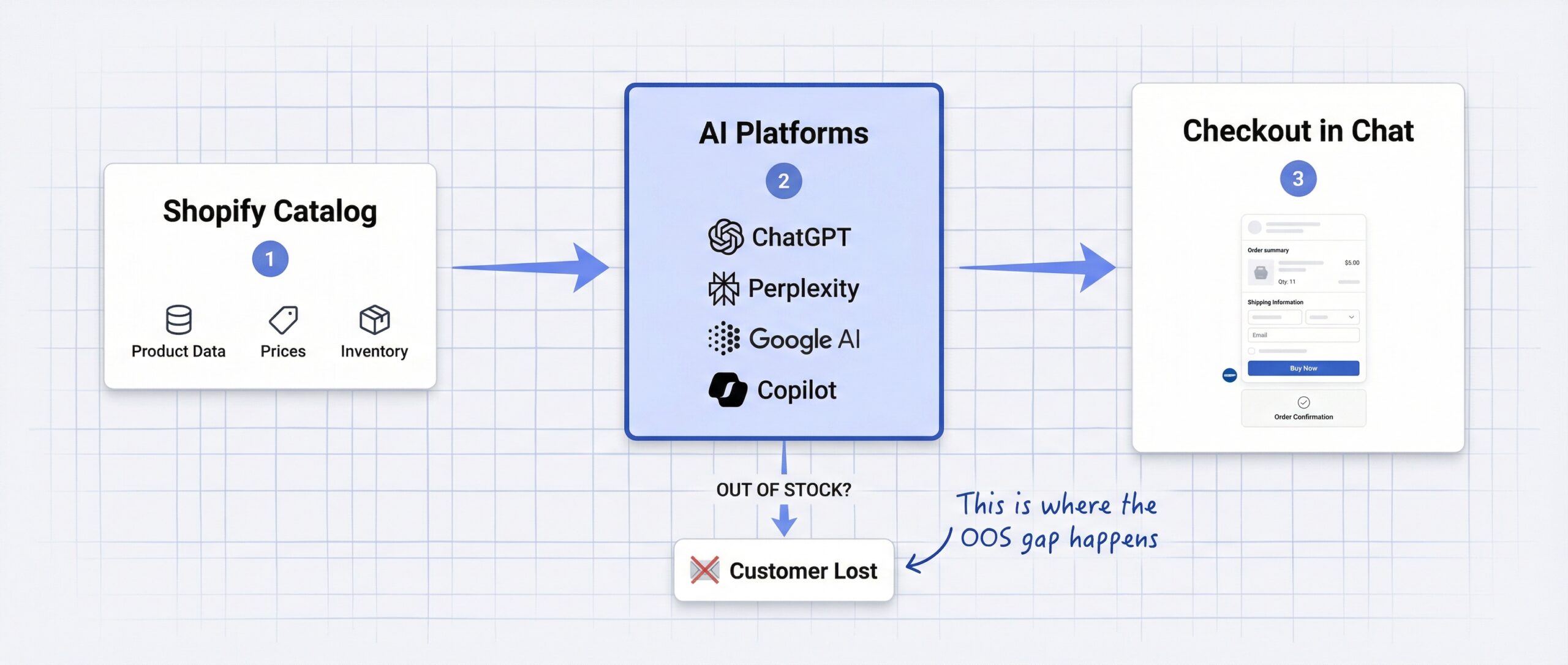
When an AI agent detects that your product is out of stock, it tells the customer the item is unavailable and typically suggests alternatives. Those alternatives are often from your competitors. There is no mechanism in any current AI chat interface for the customer to sign up for restock notifications.
Here is how the experience breaks down:
| Feature | Your Shopify store | AI chat (ChatGPT, Perplexity, etc.) |
|---|---|---|
| Product discovery | Yes | Yes (via Shopify Catalog) |
| Price display | Yes | Yes (real-time) |
| Availability status | Yes | Yes (real-time) |
| Direct checkout | Yes | Yes (via Shopify checkout) |
| “Notify Me” button | Yes (with app) | No |
| Email capture on OOS | Yes (with app) | No |
| WhatsApp opt-in on OOS | Yes (with app) | No |
| Waitlist signup | Yes (with app) | No |
| Demand analytics | Yes (with app) | No |
The left column is your controlled environment. The right column is the new reality of AI shopping. When a product is available, agentic storefronts work brilliantly. When a product is out of stock, you lose all ability to capture demand.
Two additional details make this worse:
Google’s AI shopping system lowers your product’s confidence score if it sees “Out of Stock” even once on a listing (GoDataFeed, 2026). That means future AI recommendations may deprioritize your products.
Shopify runs a second inventory check at the point of checkout. If your stock data is stale and a customer tries to buy a product that is actually out of stock, the transaction fails. That is worse than showing “unavailable” upfront.
This is not a theoretical problem for the future. ChatGPT shopping is happening right now at scale, and the Shopify agentic commerce channel is growing fast:
Meanwhile, the stockout side of the equation is just as urgent. 37% of Gen Z shoppers check three or more alternative stores when a product is unavailable (Amra & Elma, 2025). Poor product availability costs e-commerce stores up to 8% of revenue through lost sales (Shopify product availability data, 2026).
On your own store, a stockout is a problem you can manage. You show the “Notify Me” button, collect an email, and bring the customer back when you restock. You can even handle out-of-stock products on Shopify with strategies that turn stockouts into future sales. In an AI chat, a stockout is a dead end with zero data trail. You do not know the customer existed. You cannot bring them back. You cannot even measure what you lost.
You cannot fix the AI chat interface. You do not control ChatGPT or Perplexity. But you can control what happens on your end. Here are four things you can do right now.
Shopify Catalog pulls directly from your inventory levels. If your stock data lags behind reality, AI agents will show the wrong availability to customers.
Inventory inaccuracies account for 4-8% of lost sales globally, with total inventory distortion estimated at $1.1 trillion (McKinsey, 2026). In the age of agentic commerce, that number only grows.
If you hide out-of-stock products in Shopify, they disappear from Shopify Catalog entirely. That means AI agents cannot discover them, recommend them, or even acknowledge they exist.
This matters because AI agents build product awareness over time. If a customer asks ChatGPT about your product category and your product is hidden, you are invisible. When you eventually restock, the AI has no memory of your product to draw on.
Better strategy: keep products visible and show them as unavailable. You maintain AI discoverability and can capture demand through your product page. We covered this decision in detail in our guide on whether you should hide out-of-stock products on Shopify.
This is the most important step. AI agents do not have a “Notify Me” button, but your product page does. And AI agents frequently link back to your product page for verification or additional details.
When a customer clicks through from an AI conversation to your store and finds the product out of stock, a back-in-stock notification button captures their email. That is the bridge between AI discovery and demand capture.
AI-referred traffic converts well because these customers are pre-qualified. They already asked an AI about your product. They already showed intent. Do not waste that signal. A Notify Me button on your Shopify store takes five minutes to set up and captures every visitor who wants your product, regardless of where they found it.
Check your analytics for referral traffic from ChatGPT, Perplexity, and Google AI surfaces. Cross-reference that data with your most-waitlisted products. If a product gets heavy AI traffic but is frequently out of stock, you have a restocking priority problem.
Your Shopify restock notification app data tells you which products customers want most. Combine that with AI referral data, and you have a clear picture of where to focus your inventory investment.
What are Shopify agentic storefronts?
Shopify agentic storefronts syndicate your product catalog to AI platforms like ChatGPT, Perplexity, and Microsoft Copilot. Customers can discover and purchase your products directly inside AI conversations using Shopify’s secure checkout.
What happens when a product is out of stock on an agentic storefront?
The AI agent tells the customer the item is unavailable and suggests alternatives, often from competitors. There is no “Notify Me” button or email capture in any AI chat interface, so you lose the demand signal entirely.
Can customers sign up for back-in-stock alerts in ChatGPT or Perplexity?
No. As of March 2026, no AI chat platform supports restock notifications, waitlist signups, or email capture for out-of-stock products. Your product page is the only place where customers can sign up.
Do agentic storefronts work on all Shopify plans?
Agentic storefronts are rolling out in phases and are not yet available to all stores. You receive an email and admin notification when they become available. Eligible stores have them active by default.
Does Shopify charge extra for agentic storefronts?
Shopify does not charge a separate fee for agentic storefronts. Standard Shopify transaction fees apply to orders placed through AI channels, the same as regular online orders.
How often does Shopify Catalog update inventory for AI agents?
Shopify Catalog syncs inventory continuously. Shopify also runs a second inventory check at the point of checkout to verify availability before completing the transaction.
Should I hide out-of-stock products if I use agentic storefronts?
No. Hidden products are removed from Shopify Catalog entirely, which means AI agents cannot discover or recommend them. Keep products visible so they maintain AI discoverability.
How do I capture demand from AI shoppers when my product is out of stock?
Add a back-in-stock notification button to your product pages. AI agents often link back to your store for checkout verification, so a “Notify Me” button on the product page captures email addresses from AI-referred visitors.
Shopify agentic commerce opens a powerful new sales channel. Your products can now reach customers in AI conversations they are already having. But the out-of-stock experience in these channels is, for now, a step backward from what you already have on your own store.
On your product page, you have full control. You show availability, capture emails, collect WhatsApp opt-ins, and build a waitlist. In AI chat, a stockout is a silent dead end.
The fix is straightforward: keep your inventory accurate, do not hide out-of-stock products, and make sure every product page has a “Notify Me” button ready to capture demand from wherever it comes. The real cost of stockouts on Shopify goes beyond lost sales, and in the age of Shopify agentic commerce, that cost now includes invisible AI shoppers you will never get back.
AI shopping is not a future trend. Nearly half of online shoppers are projected to use AI shopping agents by 2030 (Morgan Stanley, 2025). The stores that capture demand across every channel, including AI, will recover revenue that others never even see.
Keep reading