March 12, 2026 · Gaurav Radadiya
69% of online shoppers abandon a purchase and buy from a competitor when they hit an out-of-stock product page. That alone is painful. But getting out-of-stock SEO Shopify right is about more than customer experience: the way you handle that page determines whether you also lose the organic traffic, backlinks, and demand data you spent months building.
Most stores panic. They delete the product, hide it from collections, or let it sit as a dead-end page with nothing but a “Sold Out” label. Each of these responses costs you twice: once in lost SEO equity and again in lost demand intelligence. A proper Shopify out-of-stock product page SEO strategy treats every OOS product page as both a search asset and a revenue capture opportunity.
This playbook gives you a three-part decision framework: keep the page live, redirect it, or remove it. Each path has Shopify-specific implementation steps, and the right choice depends on whether the product is coming back, how much organic value the page holds, and whether you are capturing demand in the meantime.
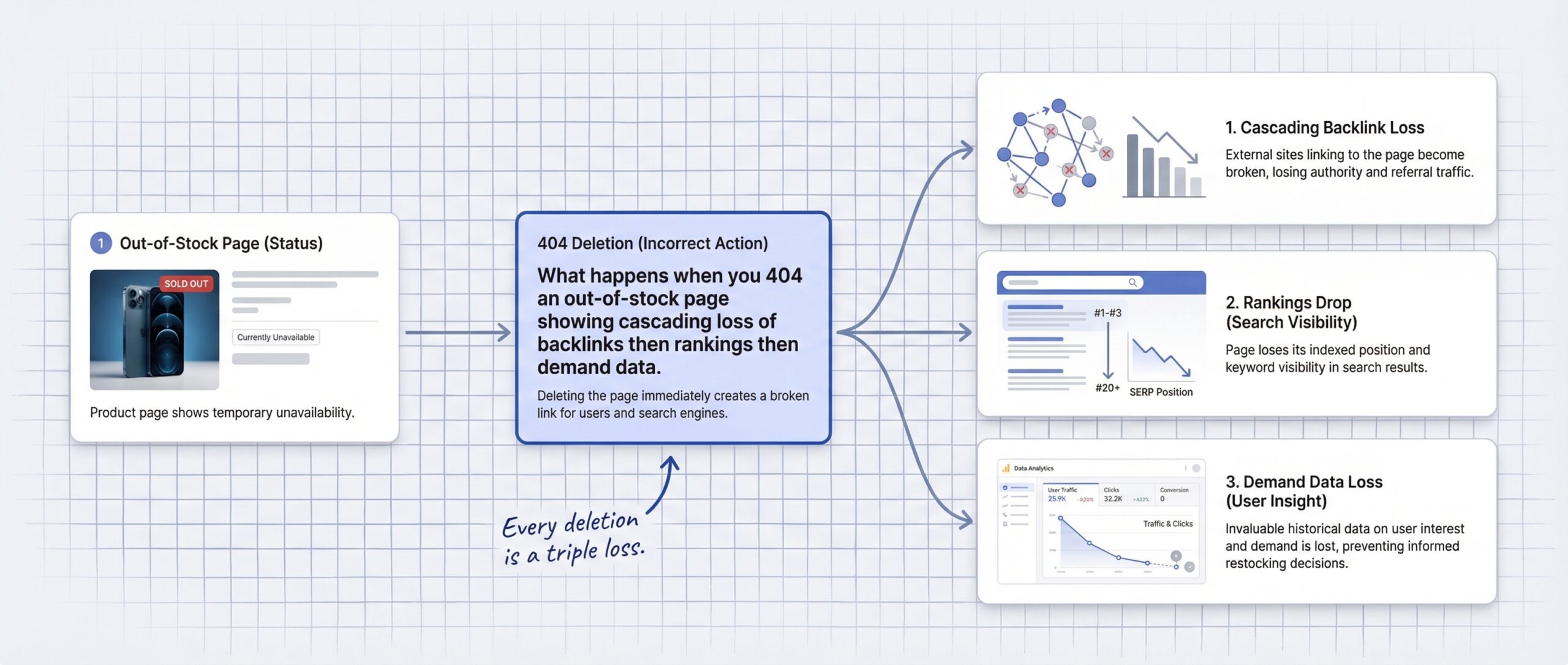
The default instinct is to hide the evidence. A product goes out of stock and the store owner’s first move is to delete it, archive it, or set it to Draft so customers stop seeing it. That feels tidy. It also destroys months of SEO work in a single click.
When you delete a product page on Shopify, every backlink pointing to that URL hits a 404 error. Those backlinks now pass zero link equity. If an industry blog linked to your bestselling product in a roundup article, that link value evaporates the moment you delete the page. According to Wolfgang Digital’s ecommerce SEO research, poorly managed 404 strategies can cost a store up to 30% of its organic traffic over time.
The temptation to hide out-of-stock products on Shopify is understandable. Nobody wants customers landing on a product they cannot buy. But hiding, deleting, or ignoring OOS pages is almost never the right move.
There is also a newer trap to watch for. In October 2025, Shopify introduced the “Unlisted” product status. It sounds like a reasonable middle ground: the product stays in your catalog but is not visible in your store. However, Unlisted adds noindex and nofollow tags to the page. That actively tells Google to stop indexing it. If you use Unlisted for temporarily out-of-stock products, you are asking Google to forget a page that you want customers to find again in a few weeks.
The damage from mishandling out-of-stock pages compounds across two dimensions: search visibility and revenue intelligence.
The SEO cost. A 404 page passes zero link equity. Every backlink, every referring domain, every piece of authority you built up on that product URL disappears. Google’s Gary Illyes confirmed in 2016 that a 301 redirect transfers 90-99% of link equity, but only when the destination content is closely related to the original. Deleting the page and leaving a 404 transfers nothing.
Worse, if Google repeatedly crawls your site and finds clusters of 404 errors where product pages used to be, it may reduce your crawl budget allocation. While true 404 pages do not waste crawl budget (Google handles them efficiently), soft 404s do. A soft 404 is a page that returns a 200 OK status code but has no meaningful content. That “Sold Out” page with nothing but a label and an empty product grid is exactly what Google treats as a soft 404.
The revenue cost. Retailers lose $1.2 trillion globally per year to stockouts. When a customer hits your out-of-stock page and finds a dead end, 91% of consumers will not wait for the product to come back. 43% buy from a competing brand instead.
But the hidden cost is the demand data you never capture. When someone visits your out-of-stock product page, that visit is a signal. That person wants your product. Without a mechanism to capture their intent, you have no idea how many people wanted that product, and you have no way to bring them back when you restock.
This is the double cost: you lose rankings today and you lose the ability to recover revenue tomorrow. If you also consider that the average stockout lasts 35 days, that is more than enough time for Google to drop your rankings and for customers to find alternatives.
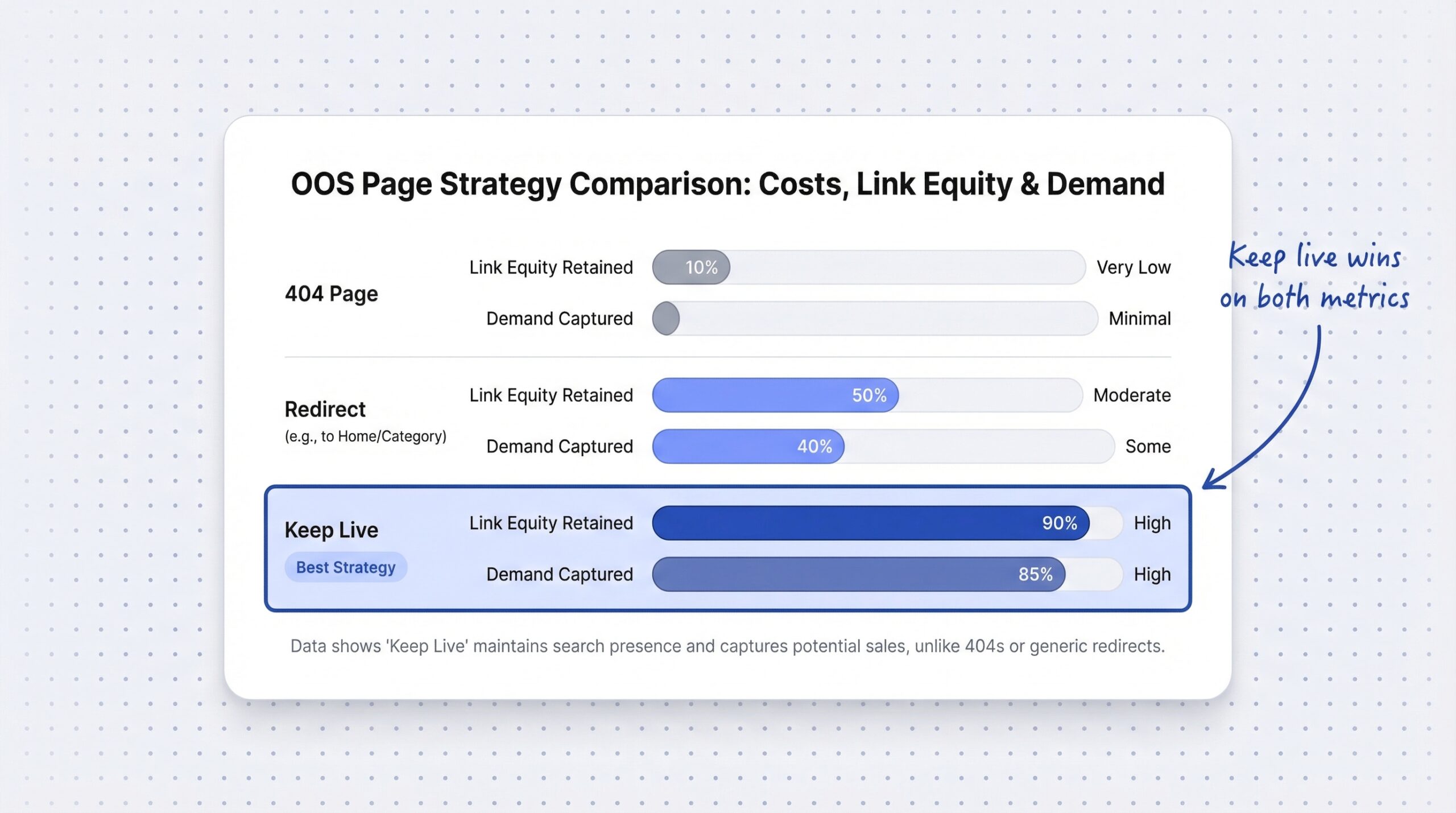
The best approach is to keep out-of-stock pages indexed when the product is coming back. This is the right move for temporarily out-of-stock products, seasonal items, and any product you plan to restock.
The criteria:
What to do on Shopify:
OutOfStock or PreOrderGoogle’s John Mueller recommends keeping the URL indexable, using structured data to communicate availability status, and linking from the homepage when the product restocks. This keeps the page in Google’s index, preserves backlink value, and signals that the page still serves a purpose.
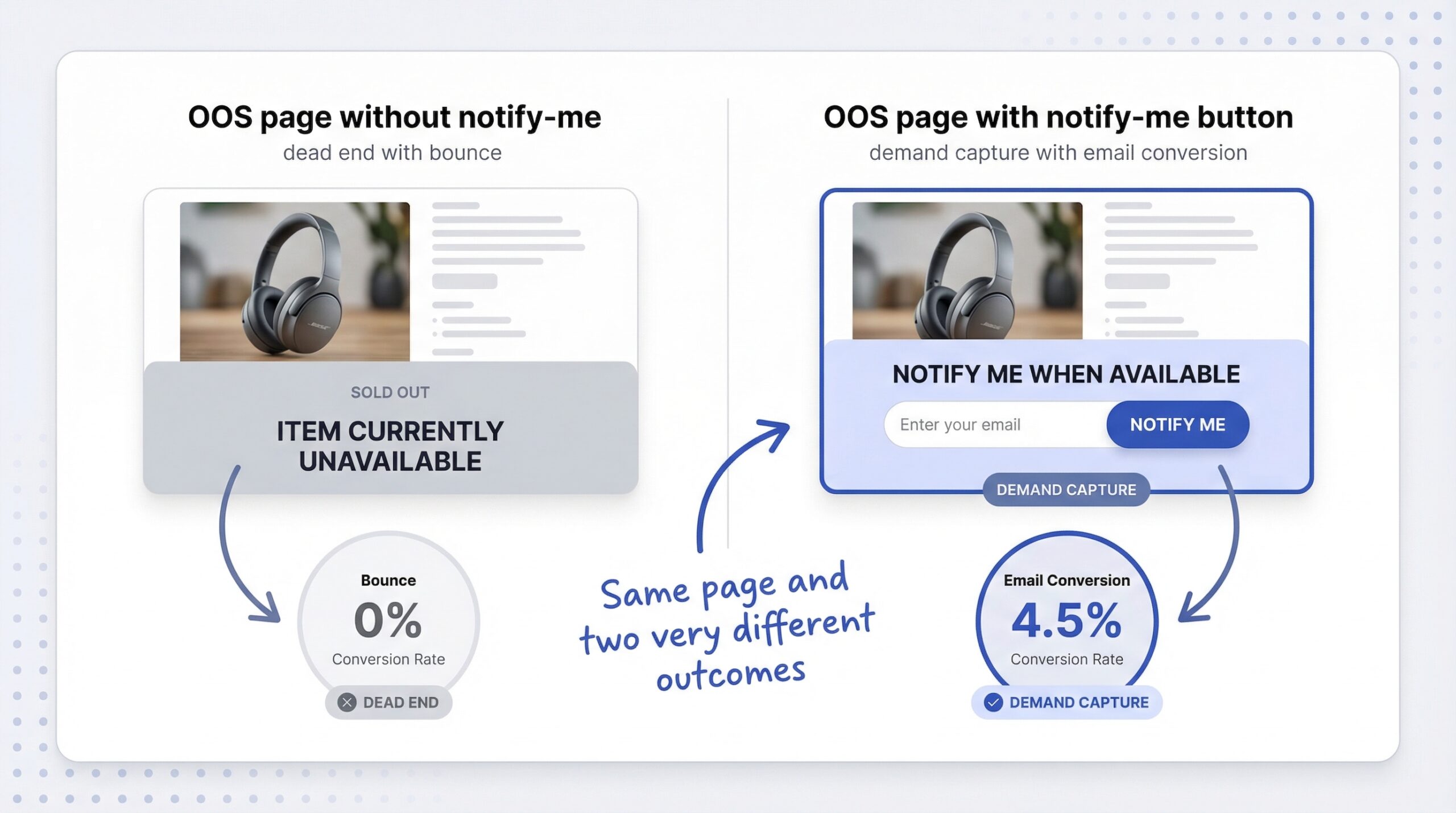
The “Notify Me” button is critical here. A page that just says “Sold Out” is a dead end. But a page with a notify-me button on Shopify serves an active function: it captures demand, builds a waitlist, and gives you data about how many customers want the product. That is a live, useful page, not a dead one.
Understanding when to use a Shopify 404 redirect for out-of-stock products can save months of SEO equity. Redirect when the product is never coming back but the page has SEO value worth preserving.
The criteria:
The redirect rules:
Shopify-specific setup:
Go to Online Store > Navigation > URL Redirects in your Shopify admin. Enter the old product URL as the “Redirect from” path and the new destination URL as the “Redirect to” path. Shopify handles the 301 response code automatically.
One common mistake: redirecting to a collection page that filters out the original product. If a customer lands on a collection page and the product they were looking for is not there, the experience is confusing. Choose redirect targets where the visitor will find what they were looking for, or at least something very close.
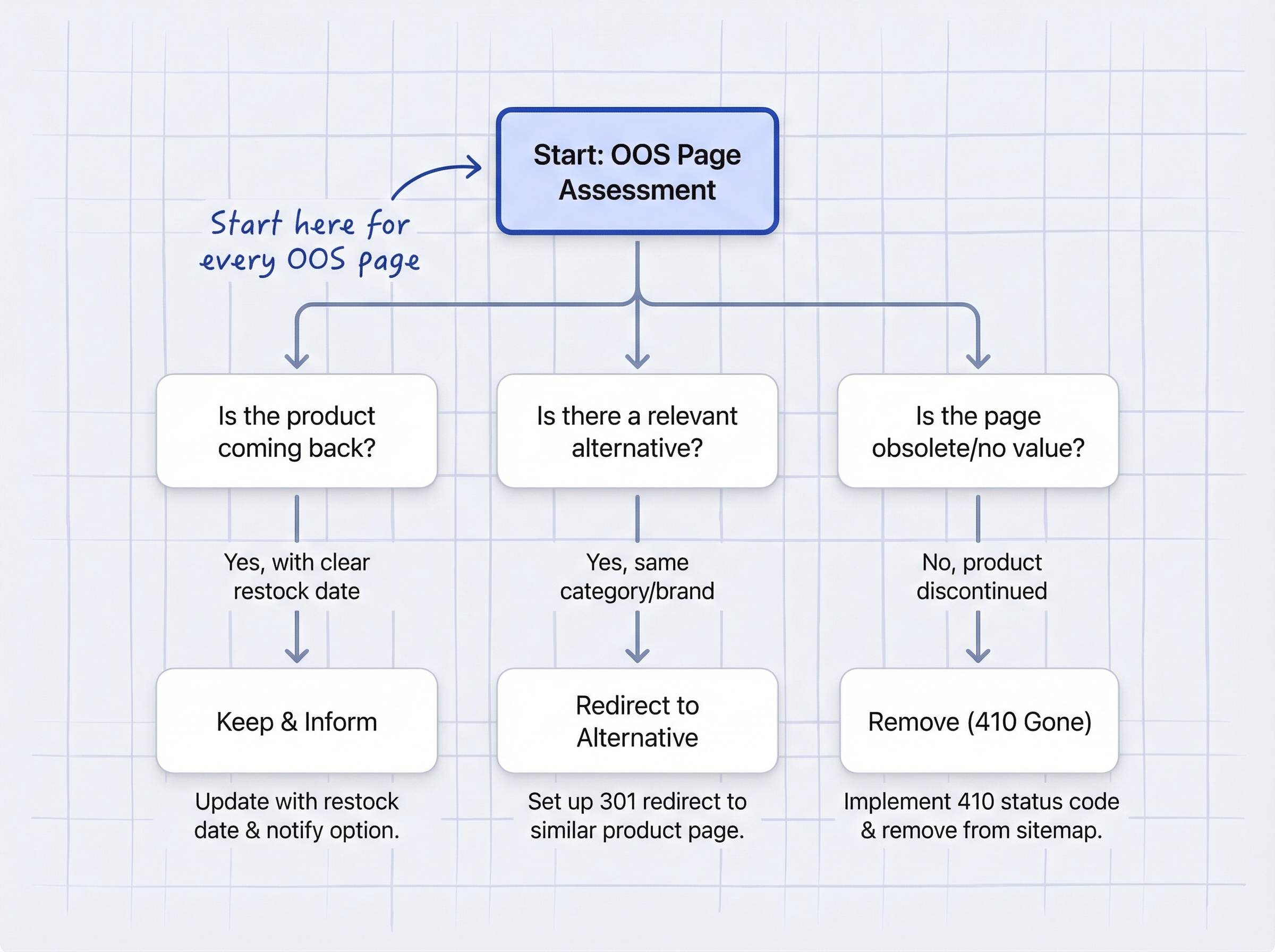
Remove the page only when all three conditions are true: the product is never coming back, the page has no meaningful organic traffic, and the page has no backlinks worth preserving.
The criteria:
What to do on Shopify:
Shopify does not support a 410 Gone status code natively. When you delete a product, Shopify returns a standard 404 Not Found. To handle this cleanly:
Even when removing a page, a redirect is better than a bare 404. It gives visitors a soft landing rather than a dead end, and it ensures any stray backlinks still pass some value to your site.
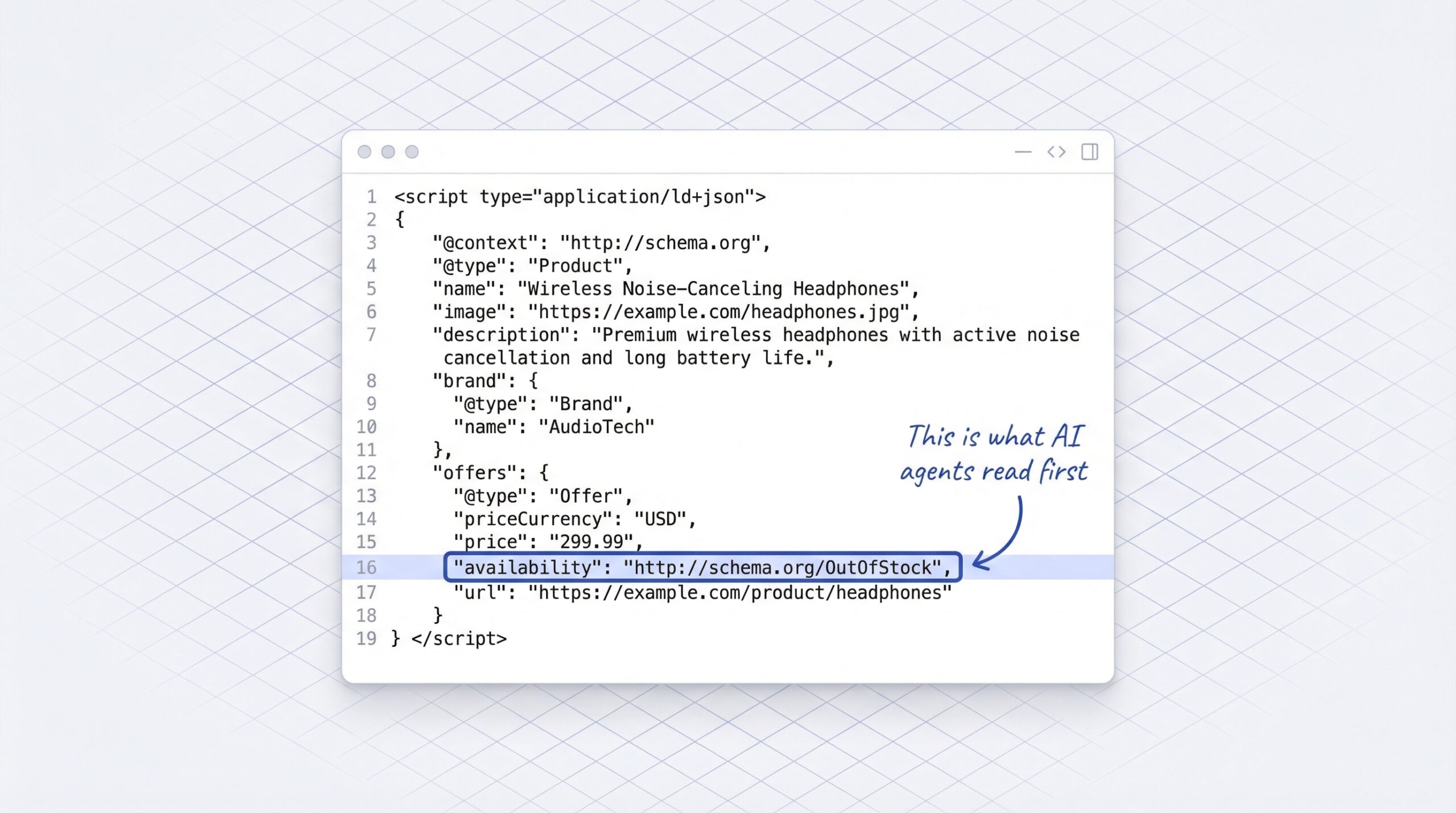
Structured data is how search engines and AI shopping agents understand your product’s availability status. Without it, Google may treat your out-of-stock page as a soft 404, and AI agents parsing your catalog through the Universal Commerce Protocol will not know whether the product is temporarily unavailable or permanently gone.
Schema.org ItemAvailability values:
| Value | Use when |
|---|---|
| InStock | Product available for purchase |
| OutOfStock | Temporarily unavailable, will restock |
| PreOrder | Accepting advance orders before availability |
| BackOrder | Ships once restocked, orders accepted now |
| Discontinued | Permanently removed from catalog |
Most Shopify themes, including Dawn, automatically set the availability based on the product.available Liquid variable. When a product variant has zero inventory and “Continue selling when out of stock” is unchecked, Dawn outputs OutOfStock in the JSON-LD markup. But you should verify this with Google’s Rich Results Test tool.
Why this matters in 2026: Google’s Universal Commerce Protocol, launched in January 2026 with support from Shopify and 20+ global partners, requires machine-readable product availability in JSON-LD format. AI shopping agents from ChatGPT, Perplexity, and Microsoft Copilot parse this structured data when deciding whether to recommend your product. A page with missing or incorrect availability markup gets skipped by agents, and you never know the customer existed.
A complete out-of-stock SEO Shopify implementation requires correct Schema.org markup. Test your product pages at Google’s Rich Results Test. Verify that the availability field correctly reflects your current inventory status. If it shows InStock for a product with zero inventory, your theme’s Liquid template needs attention.
The notify-me button is the single most important element on an out-of-stock product page. It solves three problems simultaneously.
1. It keeps the page alive for SEO. A page with a functional form and active user engagement is not a dead end. When visitors interact with the notify-me signup, they send behavioral signals (time on page, form interaction, scroll depth) that indicate the page is useful. This reduces the risk of Google treating the page as a soft 404.
2. It captures demand data. Every signup is a demand signal. If 200 people sign up for a specific product variant in a week, that is purchasing intelligence your inventory team needs. This data helps you decide what to restock, how much to order, and how urgently.
3. It recovers revenue when you restock. Back-in-stock emails achieve 58-65% open rates and 6.46-22.45% conversion rates across the industry. These are customers who already want your product. The notification just brings them back at the right moment.
The growth in this channel is accelerating. Back-in-stock email sends grew 4x year-over-year according to Omnisend’s 2025 report. And the back-in-stock conversion rate benchmarks for Shopify consistently show that restock alerts outperform every other automated email type.
Without a notify-me button, an out-of-stock page is a dead end. With one, it becomes a revenue capture point that keeps working while you wait for new inventory.
Here is the practical implementation for each scenario.
If your store has dozens or hundreds of out-of-stock products, manually managing each one is not realistic. Use Shopify Flow to automate the process:
The goal is a system where temporarily out-of-stock products stay Active (preserving SEO), get a notify-me button (capturing demand), and automatically return to full visibility when restocked.
Every out-of-stock product page falls into one of four paths:
| Scenario | Action | SEO outcome | Revenue outcome |
|---|---|---|---|
| Coming back (temporary OOS) | Keep live + notify-me + OutOfStock schema | Rankings preserved, backlinks retained | Demand captured via waitlist |
| Replaced by newer product | 301 redirect to replacement | 90-99% link equity transferred | Traffic sent to replacement |
| Permanently gone, has SEO value | 301 redirect to closest collection | Link equity transferred to collection | Visitor finds related products |
| Permanently gone, no SEO value | Delete + redirect to collection | Minimal loss (page had no traffic) | Clean catalog |
| Shopify Unlisted (avoid this) | Adds noindex/nofollow | Rankings actively removed from Google | Zero demand capture |
The key insight: there is almost no scenario where leaving a bare 404 is the right answer. Even when removing a page, a redirect to the nearest collection gives visitors a soft landing and preserves whatever value existed.
For AI shopping agents, the stakes are even higher. Out-of-stock product pages that AI agents cannot read do not just disappoint one customer. They train the agent to deprioritize your store for future queries. Getting structured data and availability signals right is not just an SEO concern anymore. It is how you stay visible in AI-driven commerce.
No, Google does not penalize stores for having out-of-stock product pages. Google’s John Mueller has confirmed that keeping temporarily out-of-stock pages indexed is the recommended approach. The important thing is to communicate the availability status correctly using Schema.org structured data. A page marked OutOfStock with accurate structured data is perfectly fine to keep indexed. What can cause problems is a page that appears empty or content-thin, because Google may treat it as a soft 404.
No. Shopify’s Unlisted status, introduced in October 2025, adds noindex and nofollow tags to the product page. This tells Google to stop indexing the page entirely. For temporarily out-of-stock products, this is counterproductive. You want the page to remain indexed so it preserves rankings and backlinks. Keep the product status as Active and use a notify-me button to handle the customer experience instead.
It depends on how much authority the page had and how long the 404 persists. For a page with strong backlinks and consistent organic traffic, Google may begin devaluing it within 2-4 weeks of encountering the 404. Full recovery after implementing a redirect can take 4-12 weeks, and you may never fully recover the original ranking position. The average stockout lasts 35 days, which is well within the window where permanent ranking damage begins.
If you are using a standard Shopify theme like Dawn, the schema markup updates automatically based on the product.available variable in Liquid. When a variant has zero inventory and “Continue selling when out of stock” is unchecked, the theme outputs OutOfStock in the JSON-LD. When you restock, it automatically switches back to InStock. You should verify this behavior with Google’s Rich Results Test tool, but most Shopify themes handle this dynamically without manual changes.
AI shopping agents from platforms like ChatGPT, Perplexity, and Microsoft Copilot read your product page’s structured data to determine availability. If the page correctly shows OutOfStock with Schema.org markup, agents can communicate the status to shoppers and may suggest subscribing for restock alerts. If the page returns a 404 or has missing structured data, agents skip it entirely. Worse, repeated encounters with broken or uninformative product pages may cause agents to deprioritize your store in future recommendations. Getting structured data right is essential for AI-era visibility.
Your out-of-stock SEO Shopify strategy comes down to a simple decision at every product page: are you going to protect the asset or throw it away?
The stores that get this right treat out-of-stock pages as temporary states, not permanent problems. They keep pages live, add notify-me buttons, maintain accurate structured data, and redirect only when a product is truly gone. A sound out-of-stock product page strategy on Shopify means understanding that a product page with organic traffic, backlinks, and demand data is worth protecting, even when the product itself is not available for purchase right now.
The stores that get it wrong delete, hide, or ignore. They lose rankings they spent months building, they lose backlinks they cannot replace, and they lose the demand signals that would have told them exactly how much inventory to reorder.
Start with the decision framework. Audit your out-of-stock pages using a clear approach for handling out-of-stock products on Shopify. Keep what has value, redirect what is replaced, and remove only what is truly dead. And on every page you keep, make sure there is a back-in-stock notification app capturing demand so that when you restock, customers come back.
Keep reading