February 10, 2026 · Gaurav Radadiya
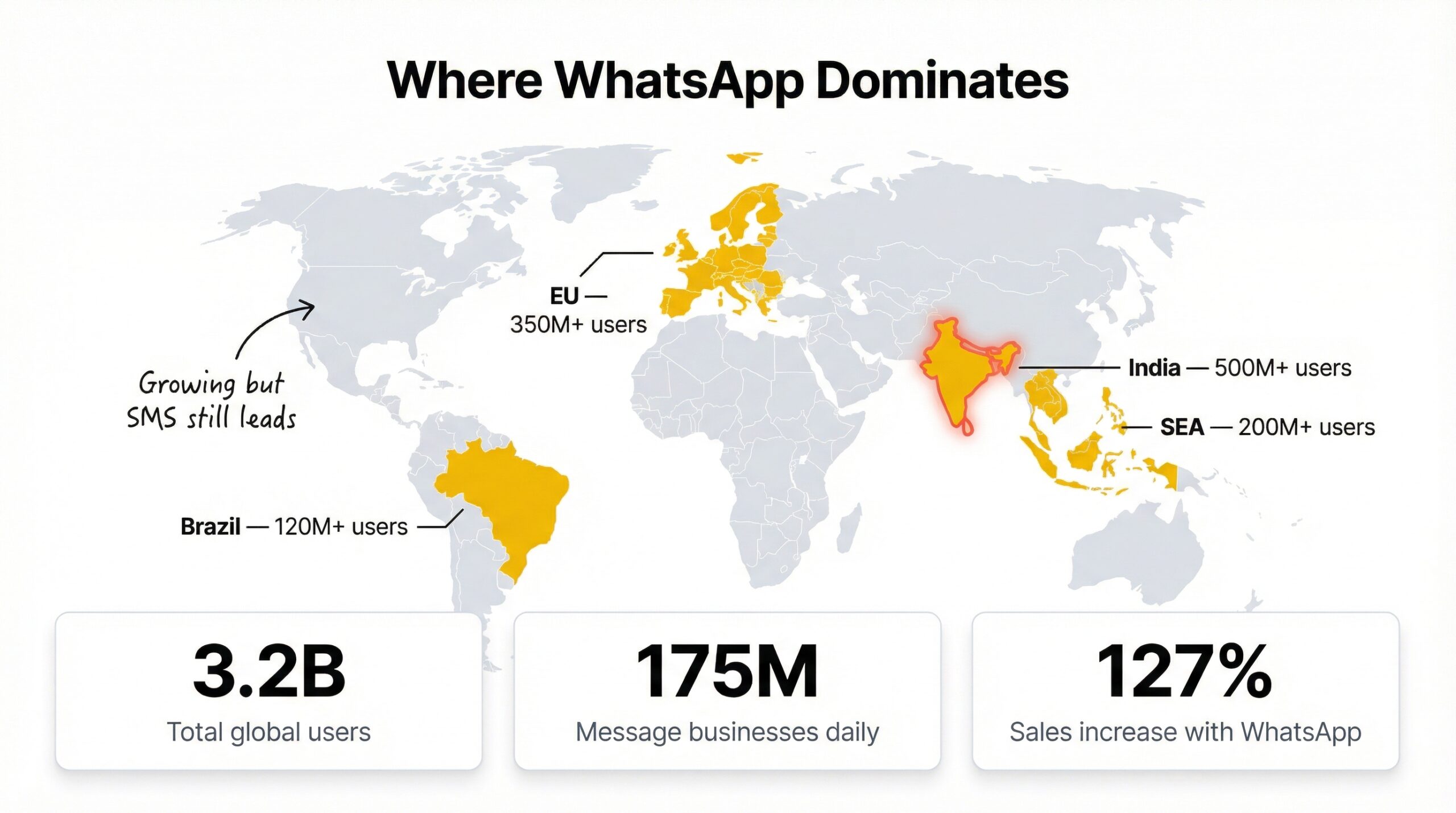
WhatsApp back in stock alerts are automated restock notifications sent through WhatsApp to customers who opted in when a product was sold out on your Shopify store. Instead of relying on email alone, these alerts land directly in the messaging app that 3.2 billion people already use every day (Wapikit, 2025).
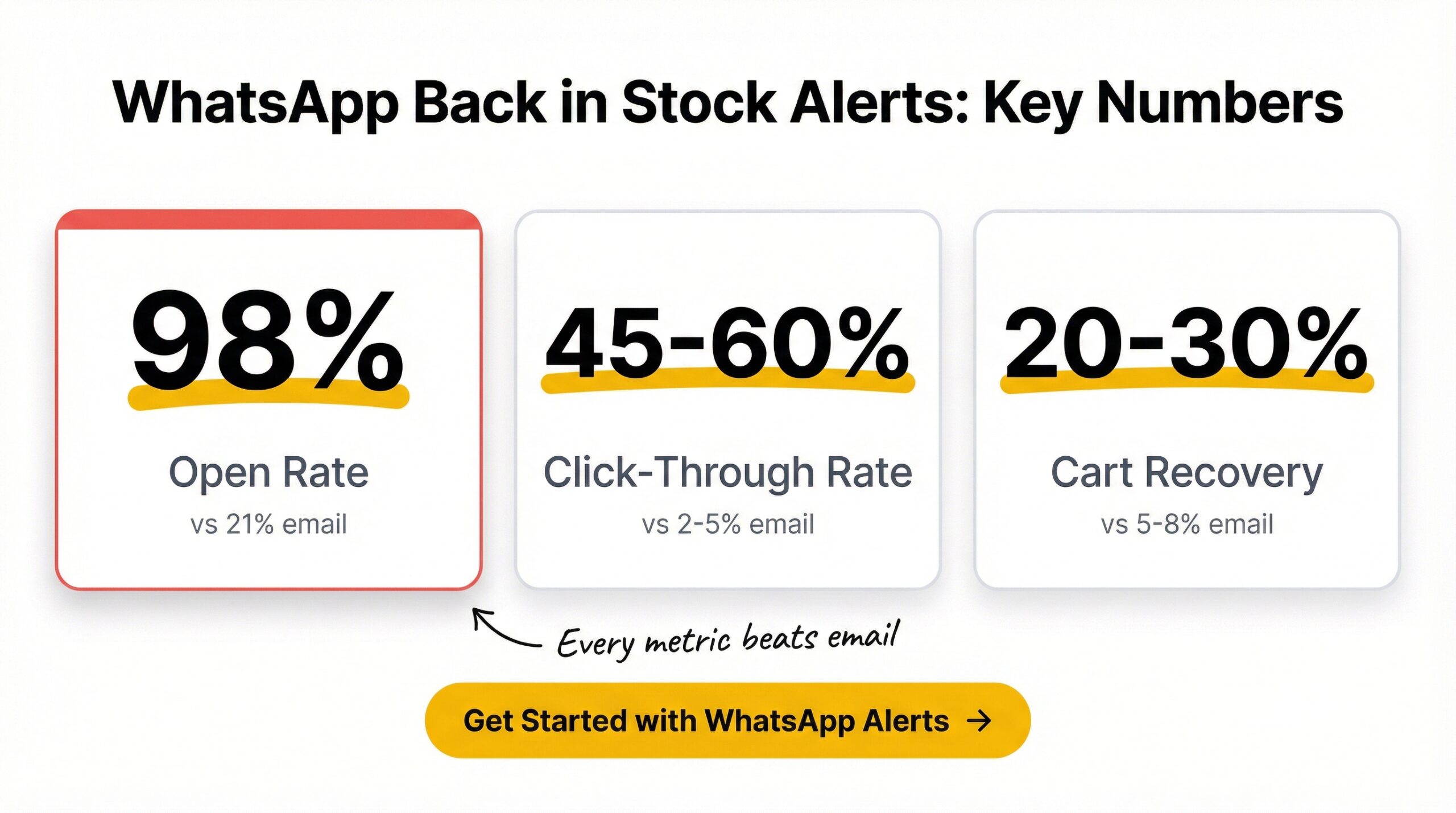
The difference in performance is not subtle. WhatsApp messages reach a 98% open rate compared to just 21% for email (Wapikit, 2025). For Shopify merchants losing revenue to stockouts, that gap between 98% and 21% can translate to thousands of dollars in recovered sales every month.
Here is the problem most store owners face: 91% of shoppers switch to a competitor when the item they want is unavailable (Amra and Elma, 2025). A standard email restock alert might reach a fraction of those customers before they buy elsewhere. WhatsApp reaches nearly all of them, and it reaches them fast. This article breaks down how WhatsApp back in stock alerts work on Shopify in 2026, what they cost, how they compare to email and SMS, and how to set them up on your store.
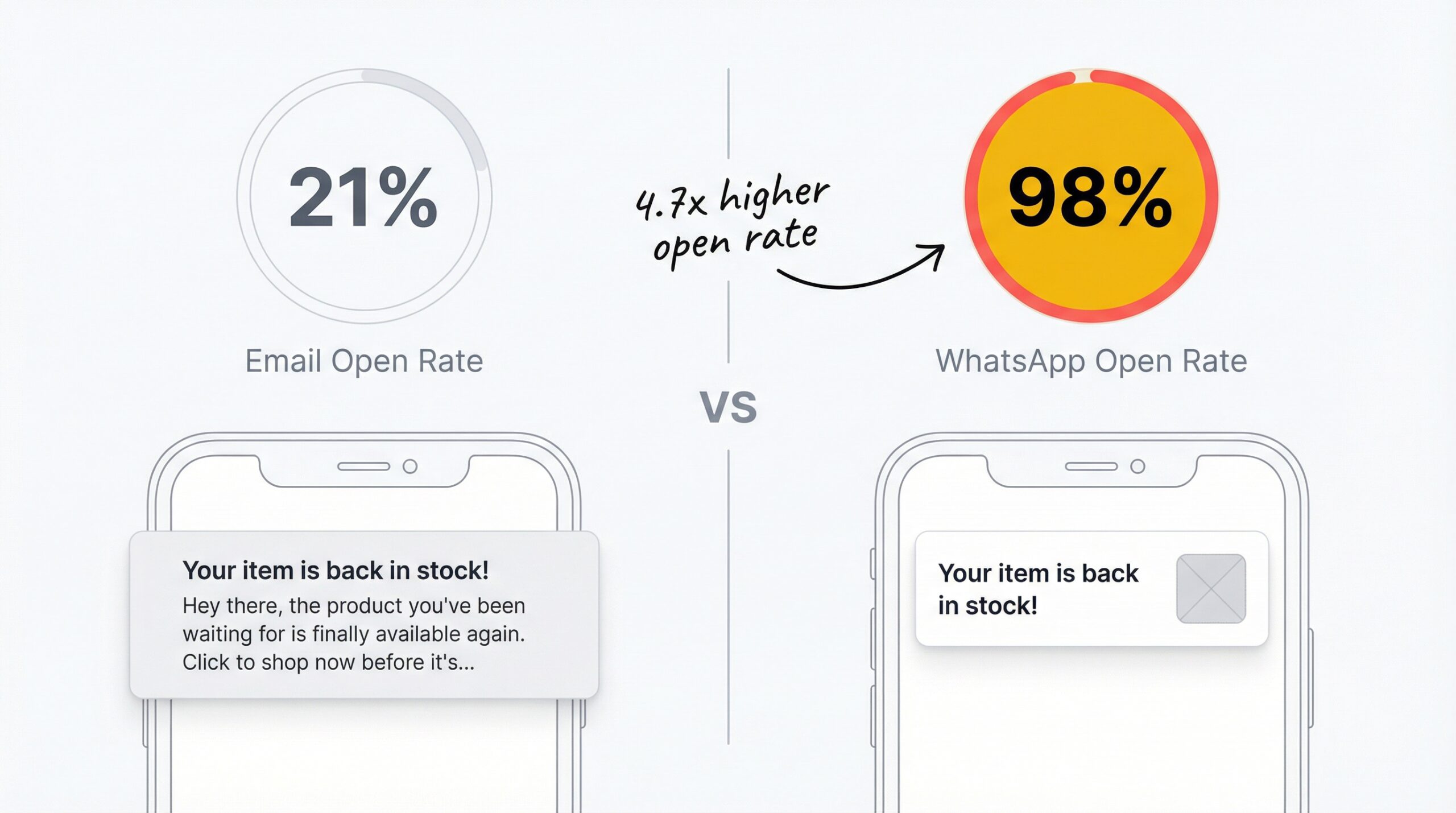
WhatsApp restock alerts outperform email because customers treat WhatsApp messages like personal conversations, not marketing noise. Email inboxes are crowded with promotions, and most restock emails compete with dozens of other brand messages. WhatsApp messages sit in the same feed as messages from friends and family.
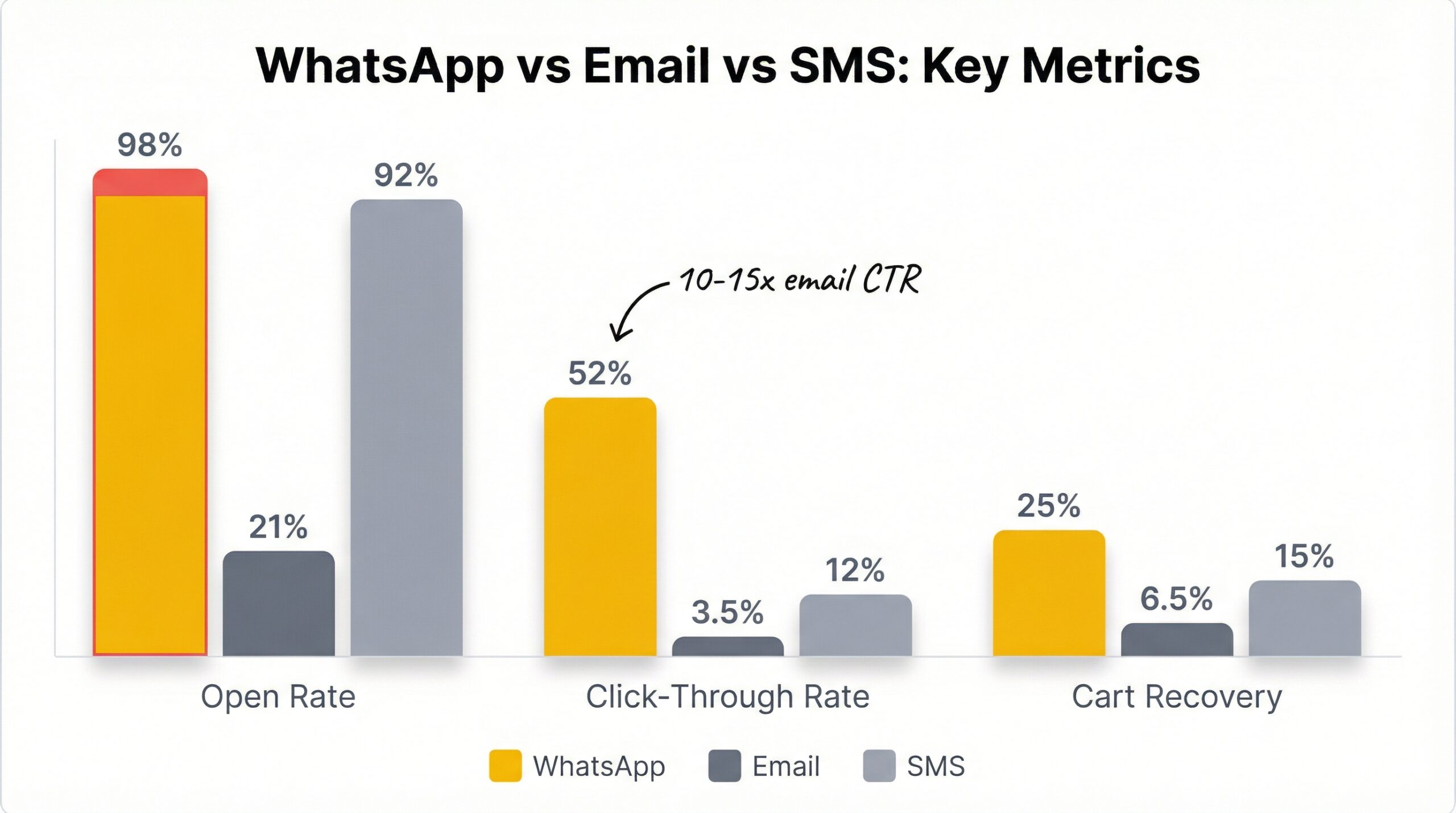
The numbers back this up across every metric that matters for Shopify merchants:
| Metric | WhatsApp alerts | Email alerts | SMS alerts |
|---|---|---|---|
| Open rate | 98% | 21% | 90-95% |
| Click-through rate | 45-60% | 2-5% | 10-15% |
| Cart recovery rate | 20-30% | 5-8% | 12-18% |
| Cost per message | EUR 0.04-0.11 | Free-low | $0.01-0.05 |
| Rich media support | Yes (images, buttons) | Yes | Limited |
| Global reach | 3.2B users | Universal | Universal |
Sources: FlowCart, 2025; Kanal, 2025; Wapikit, 2025
WhatsApp delivers a 45-60% click-through rate on promotional content (FlowCart, 2025). Compare that to email restock alerts, which average 2-5% CTR even when they are opened. For a Shopify store that sends 500 restock alerts per month, that difference means roughly 250 customers clicking through on WhatsApp versus 15 on email.
The cart recovery numbers tell a similar story. WhatsApp recovers 20-30% of abandoned carts compared to 5-8% for email (Kanal, 2025). While back in stock alerts are not identical to cart recovery messages, the underlying dynamic is the same: customers respond faster and more frequently to WhatsApp.
There is one area where email still wins: cost. Email restock alerts are essentially free for most Shopify apps. WhatsApp Business API messages carry a per-message cost. Whether the higher conversion rate justifies that cost depends on your product margins and average order value.
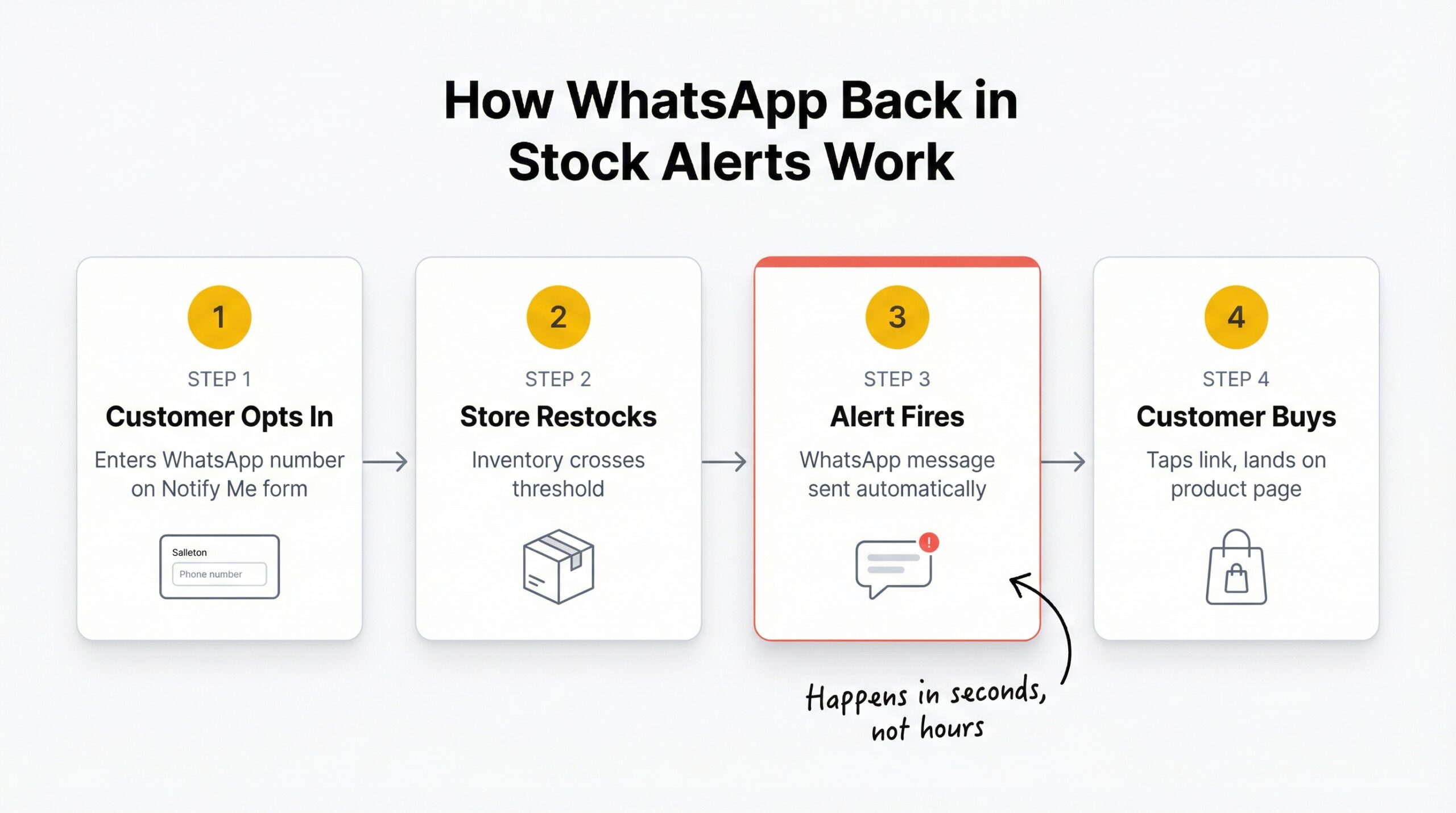
WhatsApp back in stock notifications follow a four-step process on Shopify. The flow is straightforward once you have the right app installed.
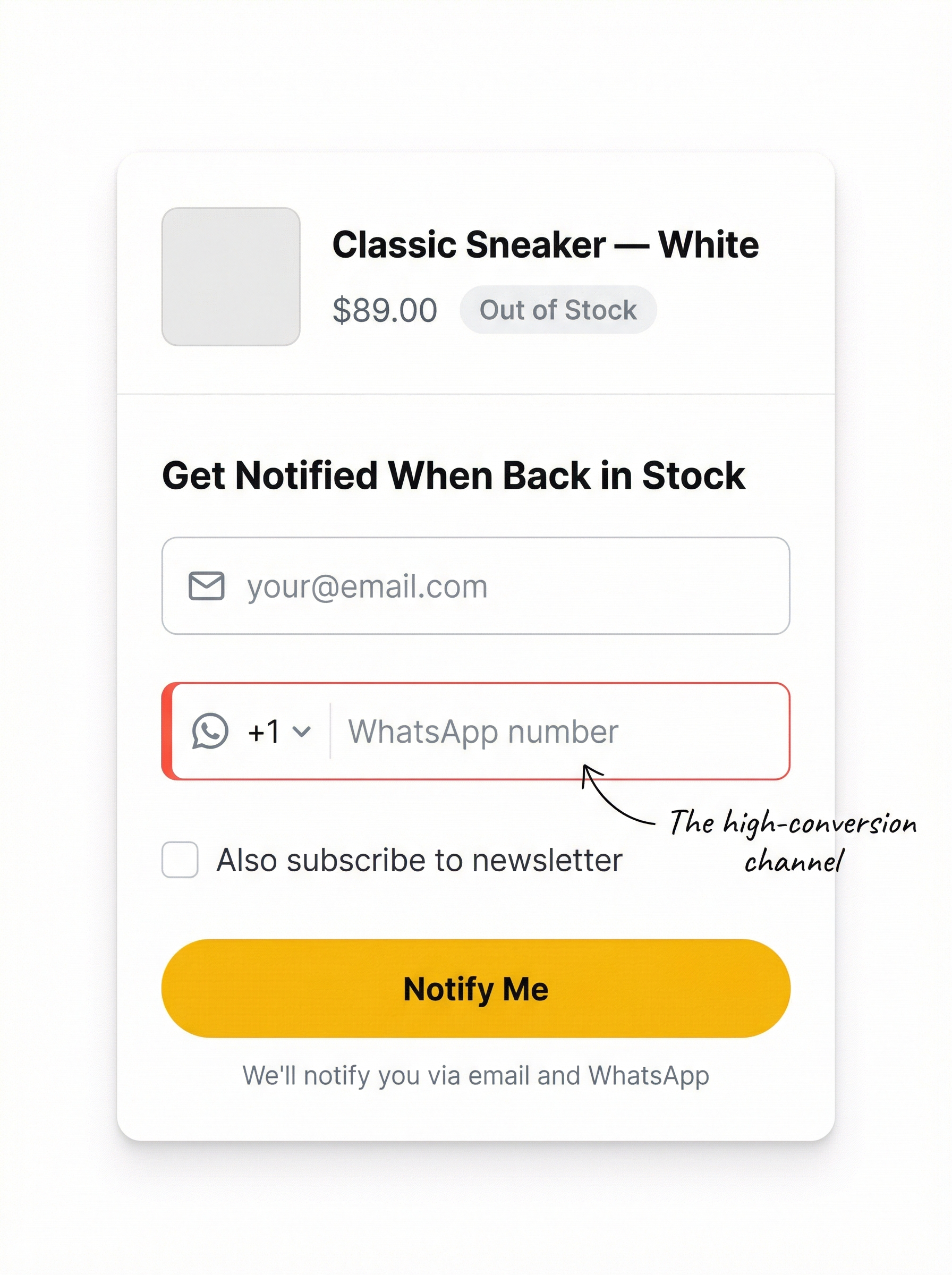
Step 1: Customer opts in. When a product goes out of stock, a “Notify Me” button appears on the product page. The customer enters their email and, optionally, their WhatsApp number. This dual collection is important because it gives you both channels for reaching them.
Step 2: Your store restocks the product. You replenish inventory through your normal Shopify workflow. The restock notification app monitors your inventory levels automatically.
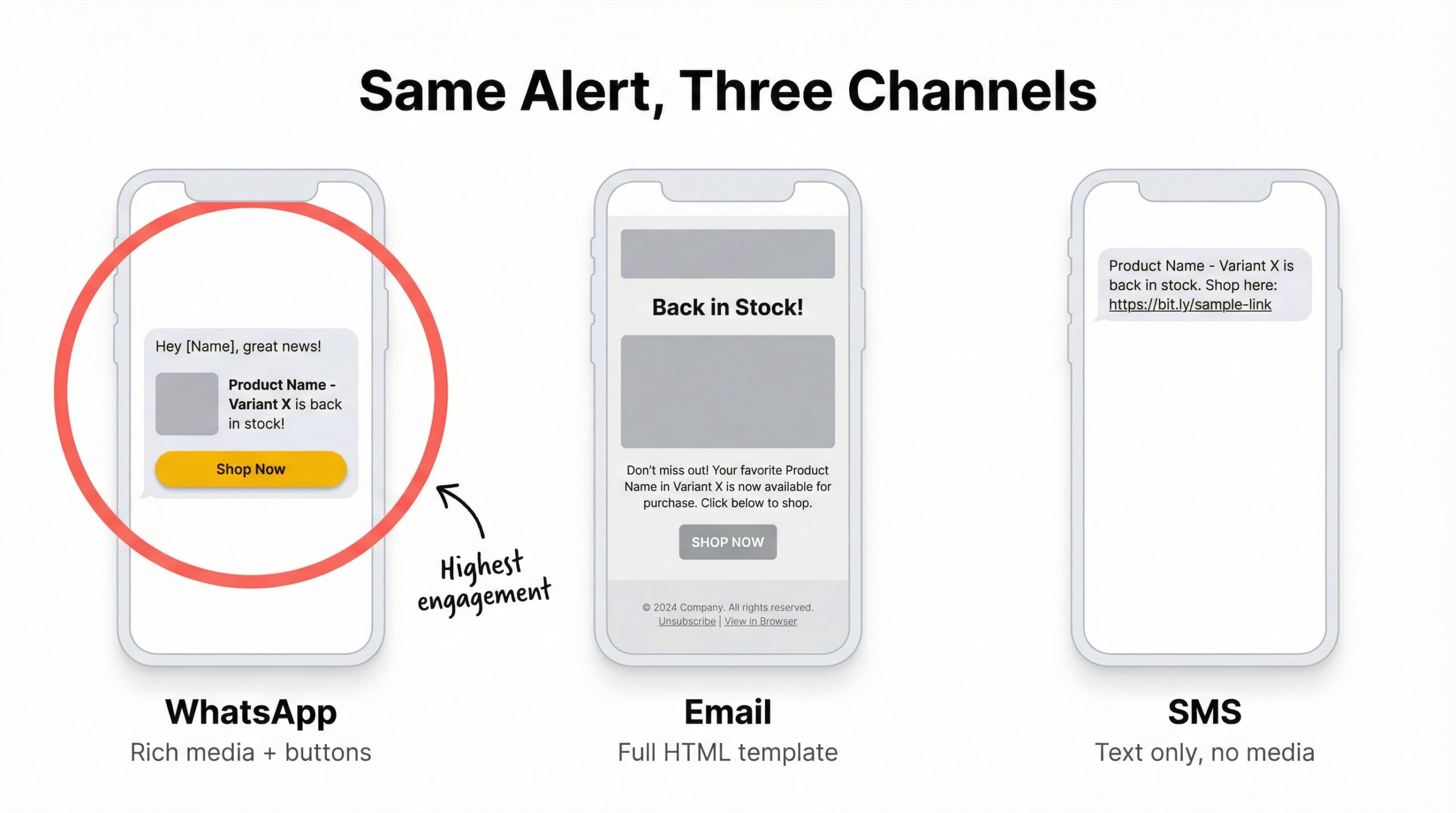
Step 3: Automated WhatsApp message fires. The moment inventory crosses your configured threshold, the app sends a pre-approved WhatsApp template message to every customer who signed up. The message includes the product name, a thumbnail image, and a direct link back to the product page.
Step 4: Customer taps and buys. The customer sees the WhatsApp notification, taps the link, and lands directly on your product page where the item is now available. No searching, no browsing, no friction.
The entire process from restock to customer notification happens in seconds, not hours. That speed matters because 175 million people message a business on WhatsApp every day (Wapikit, 2025). Customers are already comfortable buying through WhatsApp conversations.
For Shopify stores already using restock notification systems, adding WhatsApp as a channel builds on the same infrastructure. You are not replacing email alerts. You are adding a faster, higher-converting channel alongside them.
WhatsApp back in stock alert costs break down into two categories: the per-message cost from WhatsApp Business API and the monthly cost of the provider or Shopify app that connects your store to the API.
| Cost component | Range | Notes |
|---|---|---|
| WhatsApp API per message | EUR 0.04-0.11 | Varies by country and message type |
| Monthly provider fee | EUR 30-500 | Depends on message volume and features |
| Shopify app subscription | $0-29.99/month | StoreBeep plans range from free to $29.99 |
| Total cost per 500 alerts | EUR 20-55 + monthly fees | Excluding app subscription |
Source: Wapikit, 2025
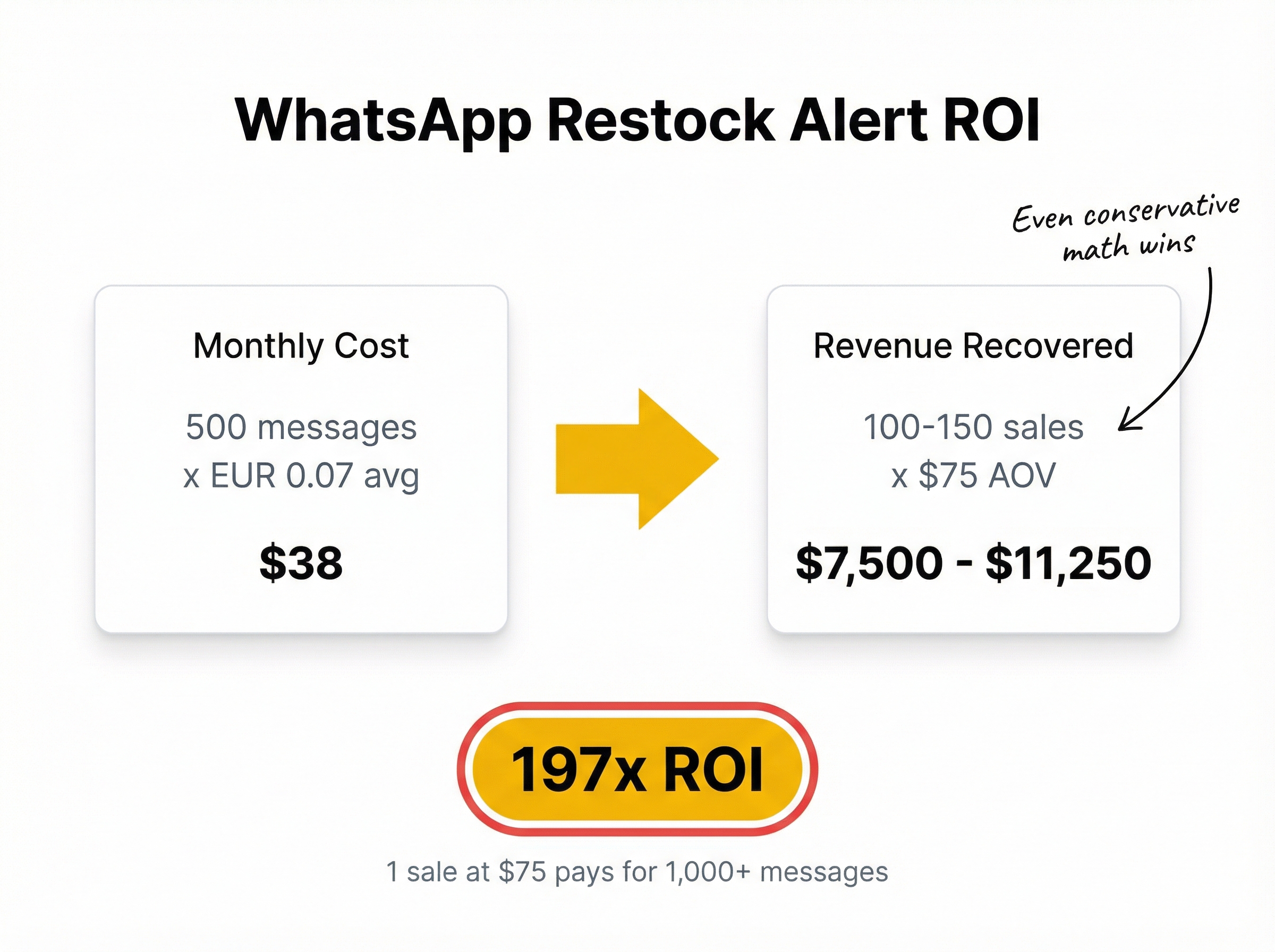
Take a Shopify store with a $75 average order value that sends 500 WhatsApp back in stock alerts per month.
Even at the conservative end, a single recovered sale at $75 covers the cost of sending over 1,000 WhatsApp messages. For stores with higher average order values, the math becomes even more compelling.
Compare that to the cost of doing nothing about stockouts. Merchants who rely solely on email alerts miss the 77% of customers who never open those emails. WhatsApp closes that gap.
Back-in-stock emails already convert at 22.45% when opened (MarketingSherpa, 2024). WhatsApp back in stock alerts push that open-to-conversion funnel even further by getting the message seen in the first place.
Setting up WhatsApp restock alerts on Shopify involves choosing the right app, enabling WhatsApp collection, and connecting to the WhatsApp Business API. Here is the step-by-step process.
Not every back-in-stock app supports WhatsApp opt-in. You need one that collects WhatsApp numbers alongside email addresses in a single form. StoreBeep back in stock alerts offers multi-channel collection, capturing email, WhatsApp, and newsletter opt-ins through one “Notify Me” button.
Once your app is installed, turn on the WhatsApp number field in your notification settings. The form should clearly explain what customers are signing up for. A simple checkbox like “Also notify me on WhatsApp” works well.
Keep the form simple. Asking for too much information reduces signups. Email plus optional WhatsApp is the right balance for most stores.
Automated WhatsApp messages at scale require the WhatsApp Business API. The standard WhatsApp Business app only handles manual messaging and cannot trigger automatic restock notifications.
You have two options for API access:
WhatsApp requires pre-approved message templates for business-initiated conversations. Your restock template should include:
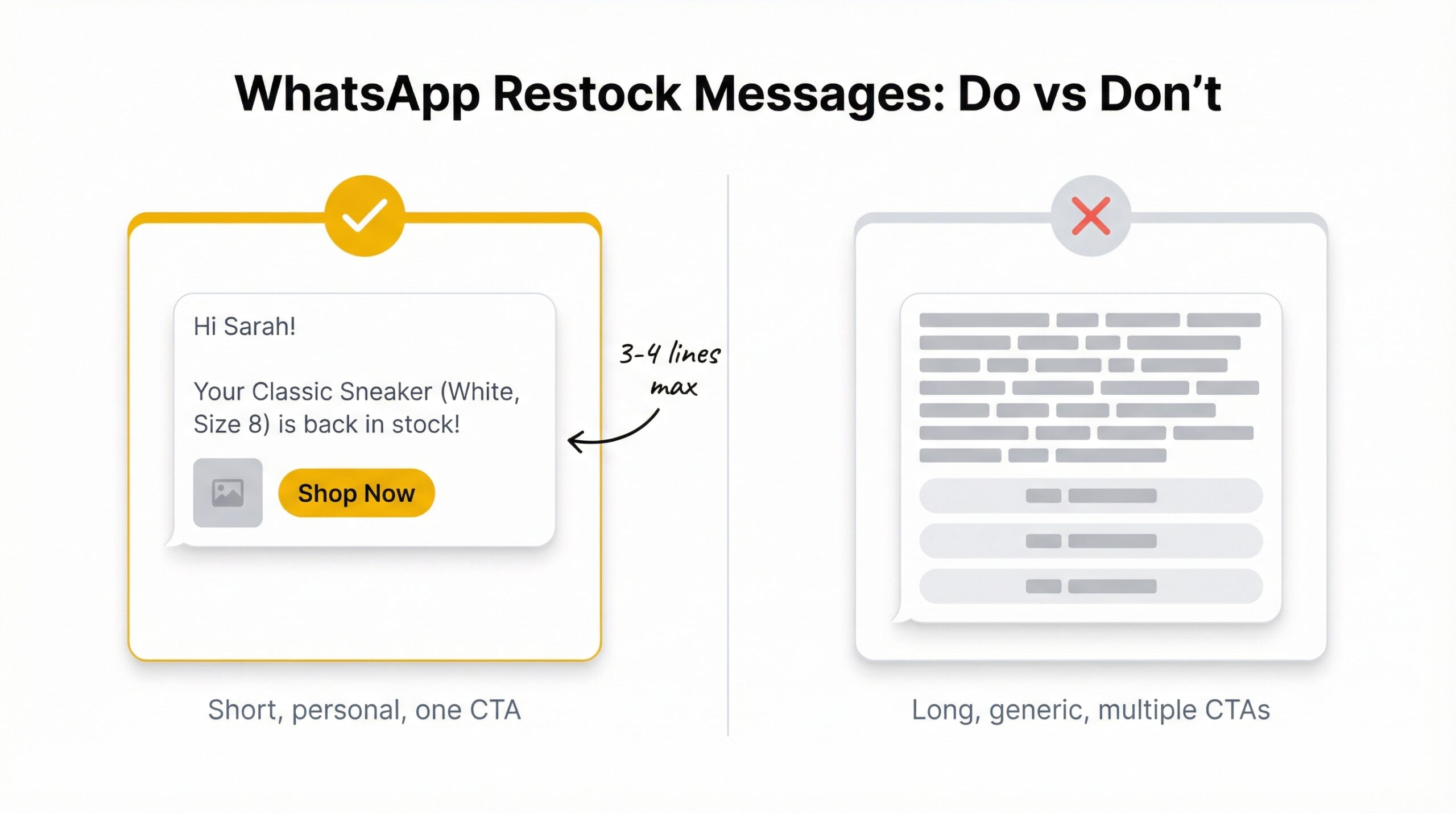
Keep the message under 100 words. WhatsApp messages perform best when they are short and direct.
Before going live, run through the entire process:
Getting WhatsApp restock alerts set up is only half the equation. How you use them determines whether customers convert or unsubscribe.
Speed is everything with WhatsApp back in stock notifications. Customers who signed up for a restock alert are warm leads with high purchase intent. Every hour you delay, that intent cools. Configure your app to send alerts the moment inventory crosses your minimum threshold.
WhatsApp is a conversational channel. Long marketing-style messages feel out of place. Your restock alert should be three to four lines maximum: a greeting, the product name, one sentence about availability, and a buy link. Include a product image to make the message visually recognizable.
| Message element | Recommended | Avoid |
|---|---|---|
| Length | 3-4 lines, under 100 words | Long paragraphs, multiple CTAs |
| Tone | Conversational, friendly | Formal marketing copy |
| Image | Product thumbnail | Generic brand graphics |
| CTA | Single “Shop now” button | Multiple links or options |
| Personalization | Customer name, product name | Generic “Dear customer” |
| Timing | Within minutes of restock | Batch sends hours later |
WhatsApp is personal space. Customers who opt in for restock alerts did not sign up for your weekly newsletter or promotional blasts. Send only what you promised: a notification when their product is back. Mixing in unrelated marketing messages will get you blocked, reported, and eventually banned from the WhatsApp Business API.
74% of consumers expect to make purchases through messaging apps (FlowCart, 2025). Meet that expectation with relevant, timely messages and customers will keep buying.
The smartest approach is not WhatsApp or email. It is both. Some customers prefer WhatsApp. Others check email more frequently. Collecting both channels through a single “Notify Me” form gives you the best recovery rates.
StoreBeep’s multi-channel collection lets you capture email, WhatsApp, and newsletter signups in one step. When a product restocks, customers get notified through their preferred channel. No duplication, no spam.
WhatsApp back in stock alerts are not the right fit for every Shopify store. The per-message cost means you need to be strategic about when they justify the investment.
| Store type | WhatsApp fit | Why |
|---|---|---|
| High-demand limited drops | Excellent | Customers need instant notification before items sell out again |
| International stores (India, Brazil, EU) | Excellent | WhatsApp dominates messaging in these markets |
| High-AOV products ($75+) | Strong | Single recovery covers hundreds of messages |
| Low-AOV, high-volume stores | Moderate | Consider email-first, WhatsApp for VIP products |
| US-only stores, low price point | Lower priority | Email may be sufficient, SMS as alternative |
WhatsApp is not equally popular everywhere. In India, Brazil, Germany, Spain, and much of Southeast Asia, WhatsApp is the default messaging app. If your Shopify store ships internationally or targets customers in these regions, WhatsApp restock alerts will dramatically outperform email.
In the United States, WhatsApp adoption is growing but SMS remains more common. For US-focused stores, consider starting with email and SMS restock alerts while testing WhatsApp with a segment of international customers.
Fashion and sneaker drops, limited-edition beauty products, electronics with supply constraints, and seasonal items all benefit from the speed of WhatsApp alerts. When products sell out quickly after restocking, the merchants who notify customers first capture the most sales.
For stores selling everyday consumables or products with consistent availability, email restock alerts may be sufficient. The key question is: does the speed and open rate advantage of WhatsApp justify the per-message cost for your specific product and margin?
Choosing the right restock notification channel depends on your store’s customer base, product margins, and geographic reach. Here is how the three main channels compare across the metrics that matter most.
| Factor | SMS | ||
|---|---|---|---|
| Open rate | 98% | 21% | 90-95% |
| Click-through rate | 45-60% | 2-5% | 10-15% |
| Cart recovery rate | 20-30% | 5-8% | 12-18% |
| Cost per message | EUR 0.04-0.11 | Free-low | $0.01-0.05 |
| Rich media | Images, buttons, catalogs | Full HTML | Limited (MMS) |
| Setup complexity | Moderate (API required) | Simple | Simple |
| Best markets | India, Brazil, EU, SEA | Global | US, Canada, UK |
| Compliance | WhatsApp Business Policy | CAN-SPAM, GDPR | TCPA, GDPR |
| Customer preference | Personal, conversational | Professional | Urgent |
| Opt-out risk | Moderate (block) | Low (unsubscribe) | Higher (STOP) |
The best-performing Shopify stores do not pick just one channel. They collect customer preferences through a multi-channel “Notify Me” form and send restock alerts through the channel each customer prefers. A 127% sales increase has been documented among businesses actively using WhatsApp for customer communication (FlowCart, 2025).
Email remains the foundation for most stores because it is free and universal. WhatsApp adds a high-conversion layer on top. SMS sits in the middle, offering strong open rates without the API complexity of WhatsApp.
For more on building an effective notification system across channels, read our guide on Shopify restock notification systems and how they recover revenue.
WhatsApp back in stock alerts give Shopify merchants a direct line to customers who already want to buy. With 98% open rates, 45-60% click-through rates, and 20-30% cart recovery, this channel outperforms email on every engagement metric.
Here are the key takeaways:
Getting started does not require a complex setup. Install StoreBeep on your Shopify store, enable WhatsApp collection on your “Notify Me” form, and start building a list of customers who want to hear from you the moment their product is back.
The merchants who recover the most revenue from stockouts are the ones who meet customers where they already are. For billions of people worldwide, that place is WhatsApp.
WhatsApp back in stock alerts are automated messages sent through WhatsApp to customers when a sold-out product returns to stock on your Shopify store. Customers opt in through a “Notify Me” button and receive a direct message with a link to purchase the restocked item.
WhatsApp messages achieve a 98% open rate compared to 21% for email (Wapikit, 2025). The click-through rate ranges from 45-60% for promotional WhatsApp content.
WhatsApp Business API messages cost EUR 0.04-0.11 per message, plus EUR 30-500 per month for a provider. A single recovered sale at $75 AOV covers the cost of sending over 1,000 messages.
WhatsApp recovers 20-30% of carts compared to 5-8% for email (Kanal, 2025). WhatsApp wins on open rates and engagement, but email is free and reaches customers regardless of messaging app preference. Use both for maximum coverage.
Yes, automated messages at scale require the WhatsApp Business API. The standard WhatsApp Business app only supports manual messaging and cannot trigger automatic notifications when products restock.
Install a Shopify app that supports WhatsApp collection, like StoreBeep back in stock alerts. Enable the WhatsApp number field in your “Notify Me” form settings, and customers can opt in to WhatsApp notifications alongside email.
India, Brazil, Germany, Spain, Indonesia, and much of Latin America and Southeast Asia use WhatsApp as their primary messaging app. Stores shipping to these regions see the strongest results from WhatsApp back in stock notifications.
Yes, multi-channel restock alerts are the recommended approach. Collect both email and WhatsApp opt-ins through a single “Notify Me” form and send notifications through each customer’s preferred channel. Check our StoreBeep blog for more guides on multi-channel notification strategies.
Keep reading