February 10, 2026 · Gaurav Radadiya
You check your Shopify dashboard and notice a bestseller went out of stock three days ago. No big deal, right? You’ll restock next week.
Except here’s what happened in those three days: dozens of customers landed on that product page, saw “Sold Out,” and left. Most of them bought from a competitor instead. Some of them will never come back.
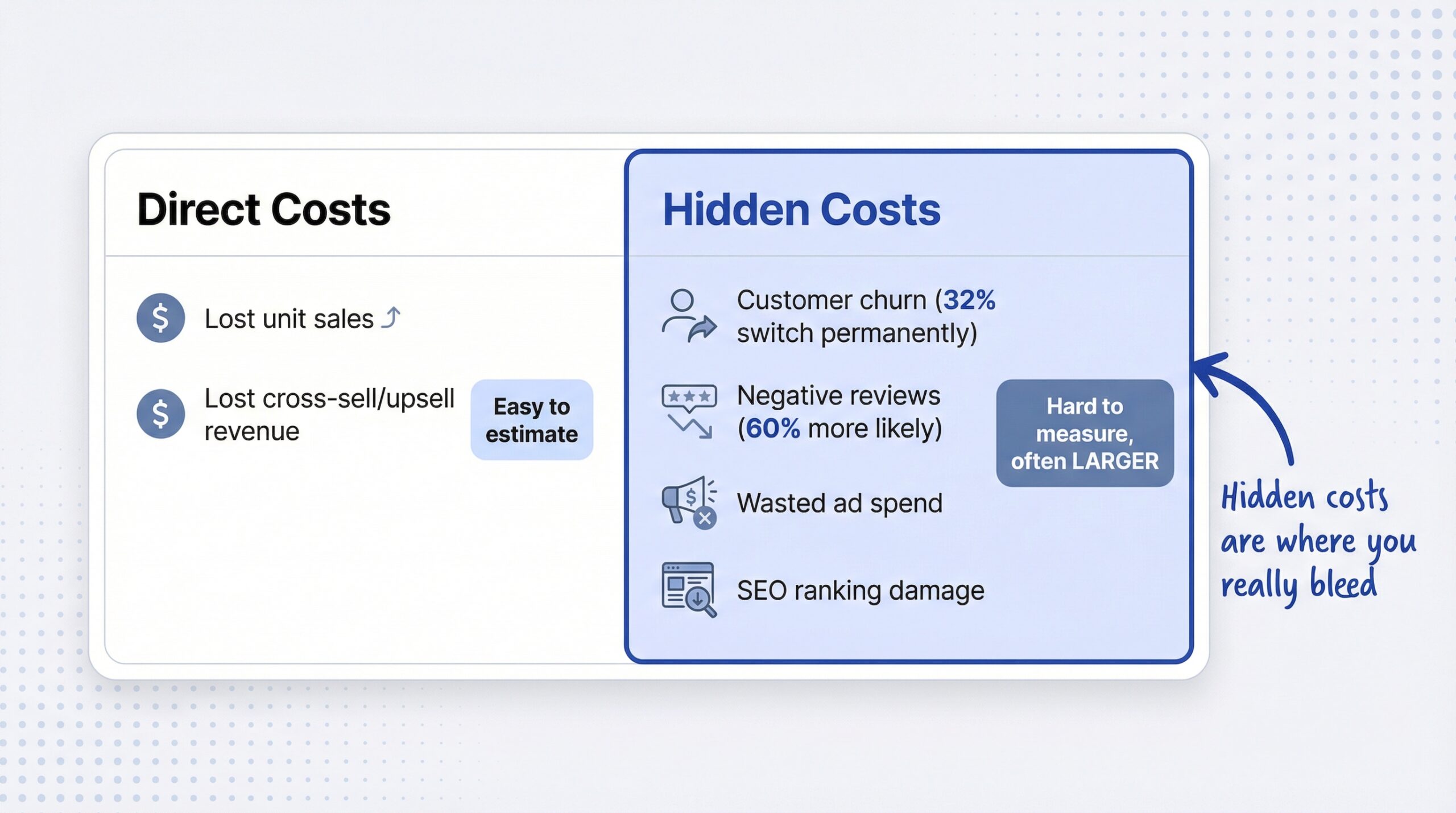
The stockout cost in ecommerce goes far beyond the obvious lost sale. Globally, out-of-stock products drain $1.2 trillion from retailers every year (IHL Group, 2024). That’s trillion, with a T. And Shopify merchants feel this pain just as acutely as big-box retailers, often without realizing how deep the damage runs.
This article gives you a practical stockout cost calculator, breaks down the hidden costs most merchants miss entirely, and shows you how to recover revenue you’re currently losing to empty product pages.
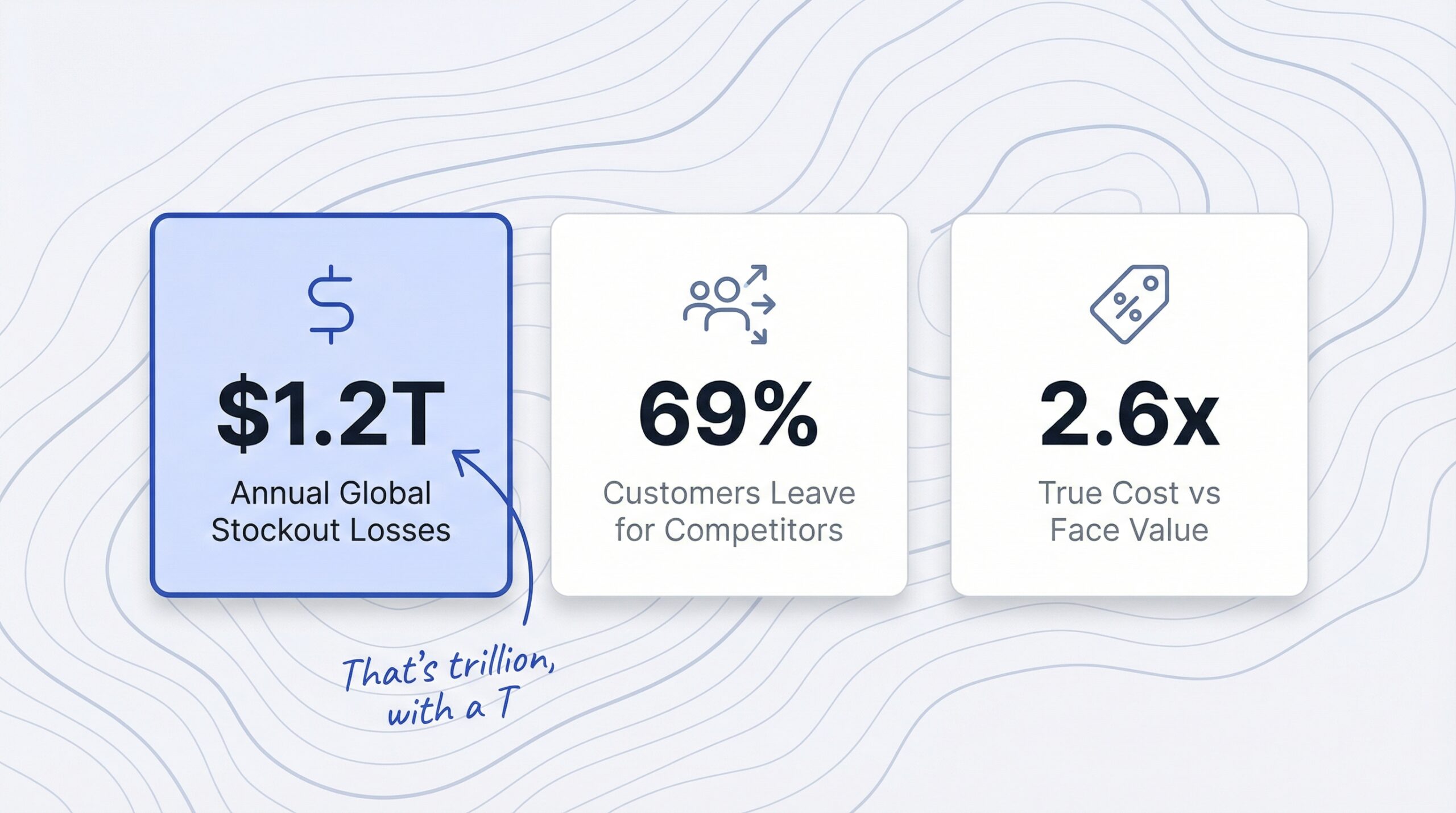
A stockout cost is the total financial impact your ecommerce store absorbs when a product is unavailable for purchase. It includes the immediate lost sale, the customers who defect to competitors, and the long-term damage to your brand reputation and customer relationships.
Most merchants only think about the surface-level math: “I couldn’t sell 10 units today, so I lost $500.” But stockout costs compound. A single week of being out of stock on a popular product can cost you multiples of what you’d calculate at face value.
There are two categories of stockout cost:
| Cost Type | What It Includes | Visibility |
|---|---|---|
| Direct costs | Lost unit sales, lost cross-sell/upsell revenue | Easy to estimate |
| Hidden costs | Customer churn, negative reviews, wasted ad spend, SEO damage | Hard to measure, often larger |
The hidden costs are where most Shopify stores bleed money without realizing it. A customer who buys from your competitor today might never search for your brand again.
The data paints a harsh picture for merchants who shrug off out-of-stock products.
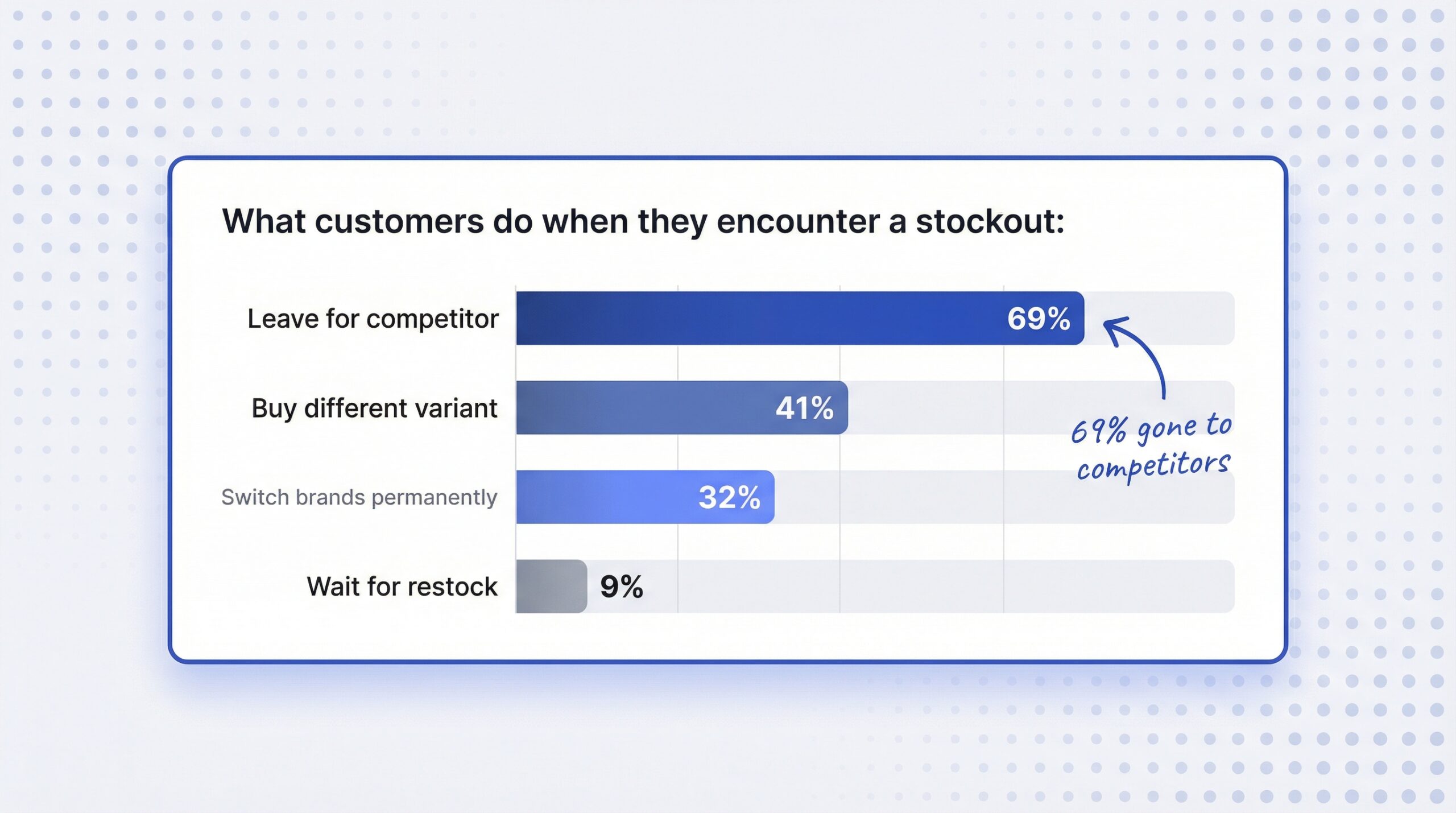
69% of shoppers leave for a competitor when an item they want is out of stock (Opensend, 2025). They don’t bookmark your page. They don’t come back next week. They search, find the same product elsewhere, and buy.
And it gets worse. Industry research shows that 91% of consumers won’t wait for a restock. The remaining 9% might check back, but the vast majority have already moved on.
Here’s what customers typically do during a stockout:
| Customer Behavior | Percentage | Impact on Your Store |
|---|---|---|
| Leave for competitor | 69% | Permanent revenue loss + competitor gains |
| Switch brands permanently | 32% | Lost customer lifetime value |
| Buy a different variant | 41% | Lower margin or wrong inventory signal |
| Leave negative review | 60% more likely | Brand reputation damage |
| Wait for restock | ~9% | Minimal, most forget |
The average ecommerce out-of-stock rate sits at roughly 8% (Opensend, 2025). That means about 1 in 12 products in a typical catalog is unavailable at any given time. For a store with 100 SKUs, that’s 8 products silently losing you money right now.
40% of all lost retail sales are attributed directly to stockouts (Datawiz, 2025). Not slow marketing. Not poor design. Simply not having the product available when someone wanted to buy it.
Here’s the formula every Shopify merchant should know. Start with the basic calculation, then layer in the hidden costs for a more accurate picture.
Stockout Cost = Days Out of Stock x Average Daily Units Sold x Price Per Unit
This gives you the floor, the minimum you’re losing. But it significantly underestimates the real damage.
Total Stockout Cost = Basic Cost + Cross-Sell Loss + Customer Lifetime Value Loss

Where:
- Basic Cost = Days OOS x Avg Units/Day x Price/Unit
- Cross-Sell Loss = Basic Cost x Cross-Sell Factor (typically 0.20-0.35)
- CLV Loss = Affected Customers x Churn Rate x Customer Lifetime Value
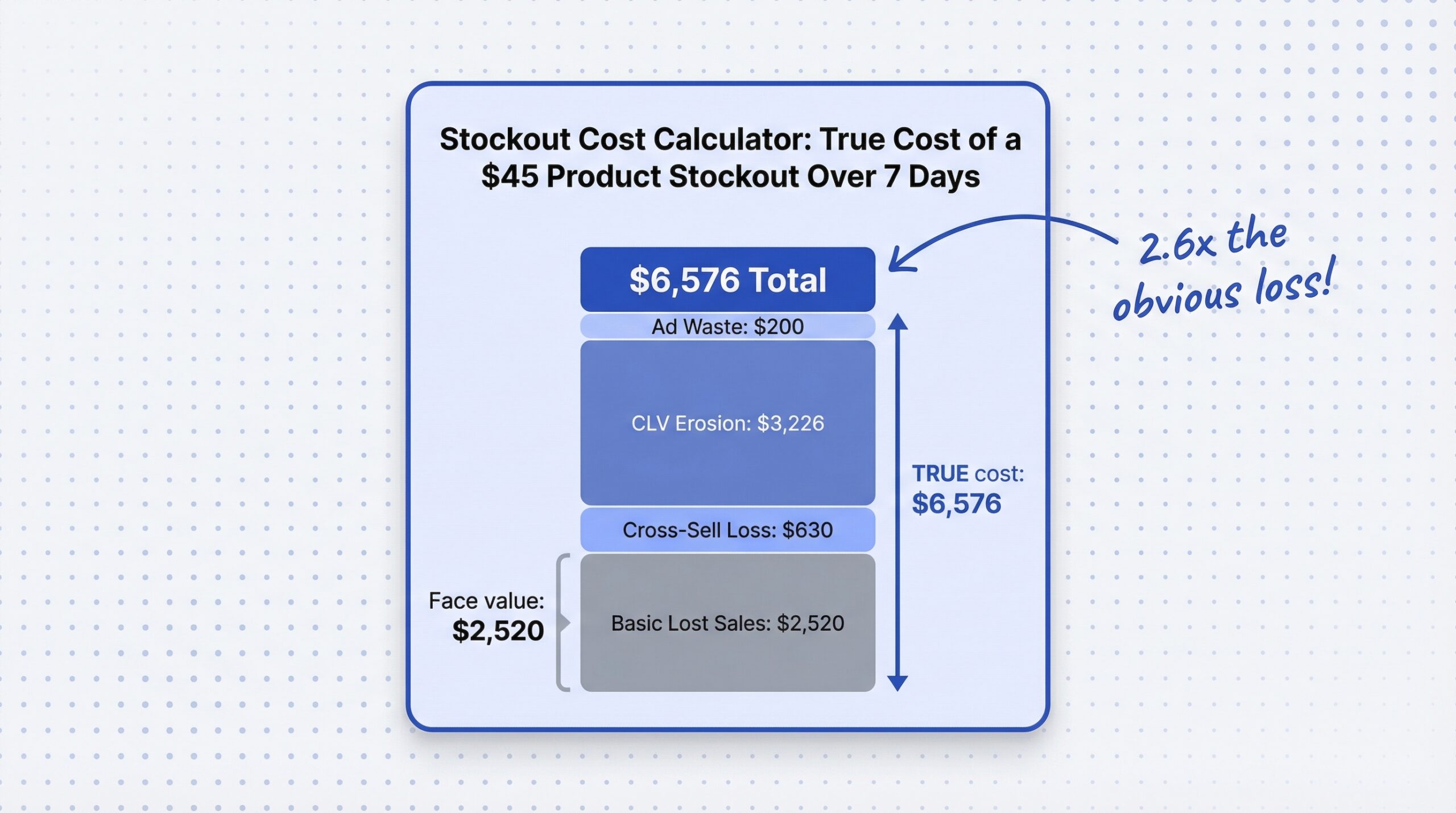
Let’s say you sell a skincare product at $45. You average 8 units per day. It goes out of stock for 7 days.
| Cost Component | Calculation | Amount |
|---|---|---|
| Basic lost sales | 7 days x 8 units x $45 | $2,520 |
| Cross-sell/upsell loss | $2,520 x 0.25 | $630 |
| CLV erosion | 56 customers x 32% churn x $180 CLV | $3,226 |
| Ad spend waste | Estimated PPC to OOS pages | ~$200 |
| Total stockout cost | $6,576 |
That $2,520 in “obvious” lost sales? It’s actually $6,576 when you account for everything. Nearly 2.6x the face-value loss.
And that’s for one product, for one week. Multiply this across every out-of-stock SKU in your catalog, and the annual number gets uncomfortable fast.
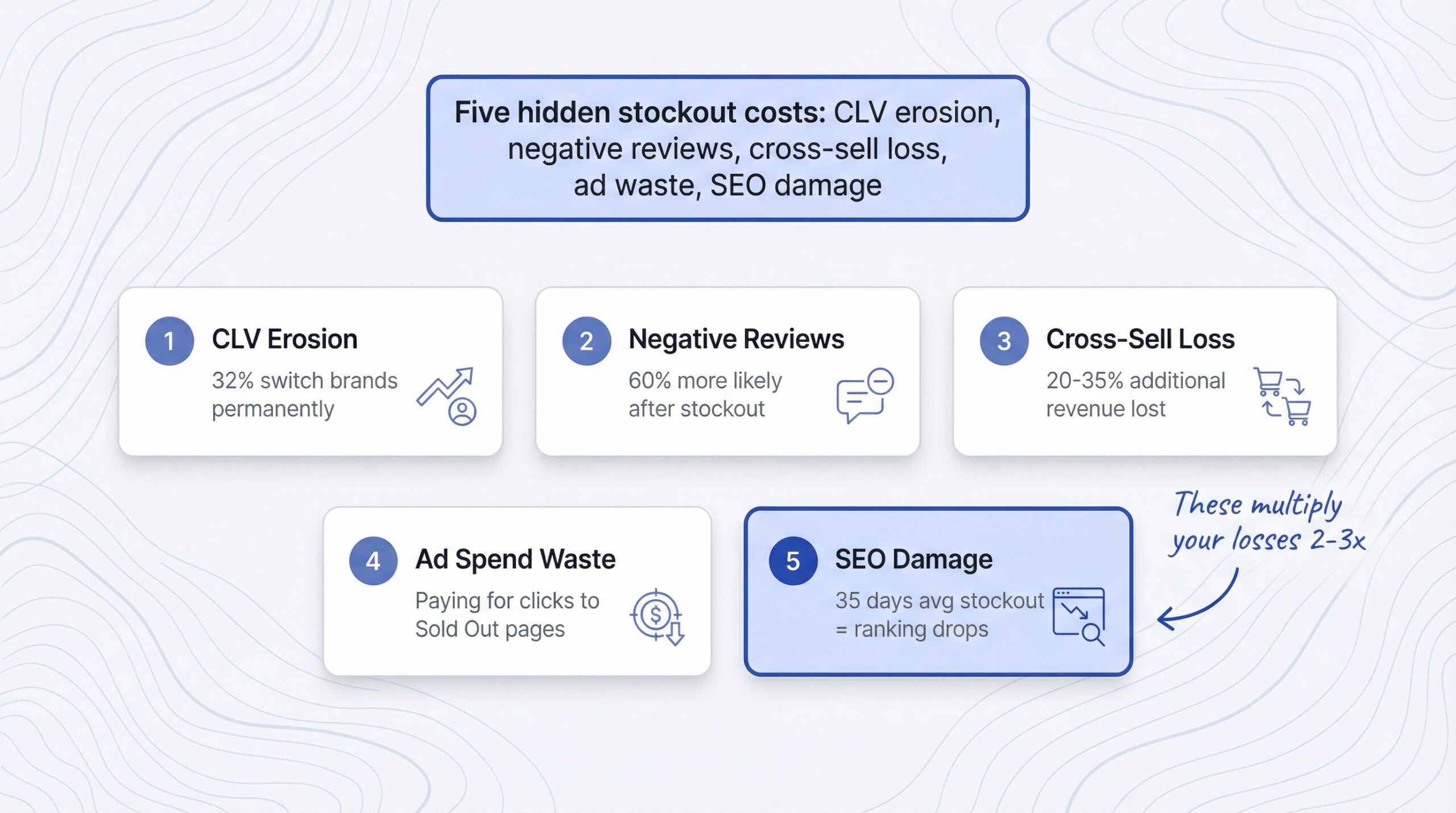
The direct lost sale is just the beginning. These five hidden costs are where stockouts really hurt your business.
When a customer can’t buy what they came for, 32% switch brands permanently. They don’t just buy from a competitor once, they may never return to your store.
If your average customer lifetime value is $180, losing even 10 customers permanently to a single stockout event costs you $1,800 in future revenue. For stores with higher CLV products, this number climbs quickly.
Frustrated customers don’t just leave. Customers are 60% more likely to leave a negative review after encountering a stockout (Slimstock, 2025). That negative review then discourages future customers who never experienced the stockout themselves.
A single 1-star review mentioning “always out of stock” can lower conversion rates on that product page for months.
When customers don’t buy the product they came for, they also don’t add complementary items to their cart. If your average order includes 1.5 items and the stockout kills the anchor product, you lose the entire cart value, not just the one SKU.
Industry data suggests cross-sell revenue loss adds 20-35% on top of the direct stockout cost.
If you’re running Google Shopping ads, Meta ads, or any paid traffic to product pages, you’re paying for clicks that land on “Sold Out” pages. Those clicks cost you money with zero chance of conversion.
Even worse, high bounce rates from out-of-stock pages can lower your Quality Score in Google Ads, increasing your cost-per-click on future campaigns.
When visitors land on out-of-stock product pages and immediately bounce, it sends negative engagement signals to search engines. High bounce rates, low time-on-page, and pogo-sticking (returning to search results immediately) can gradually erode your organic rankings for that product.
The average stockout lasts approximately 35 days in ecommerce. That’s five weeks of negative engagement signals accumulating on your product page.
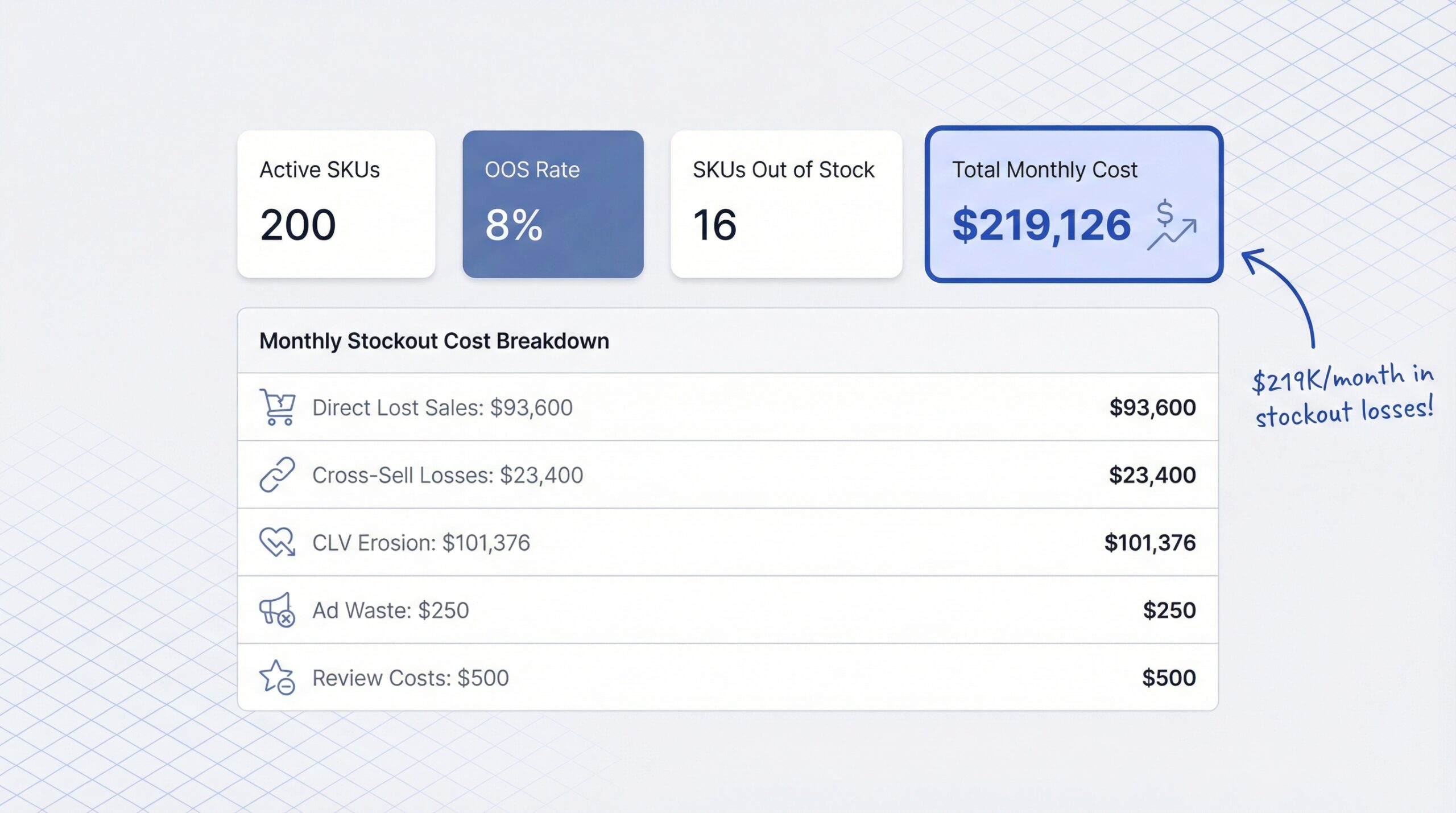
Let’s walk through a realistic Shopify stockout scenario for a mid-size store to show how costs compound across multiple products.
With an 8% OOS rate, approximately 16 products are out of stock at any time.
| Cost Category | Monthly Calculation | Monthly Cost |
|---|---|---|
| Direct lost sales | 16 SKUs x 3 units x $65 x 30 days | $93,600 |
| Cross-sell losses | $93,600 x 0.25 | $23,400 |
| CLV erosion | 1,440 customers x 32% x $220 | $101,376 |
| Wasted ad spend | ~5% of budget to OOS pages | $250 |
| Negative review costs | Estimated brand impact | ~$500 |
| Total monthly cost | $219,126 |
Even if you discount the CLV number by half (since not all churned customers would have become repeat buyers), you’re still looking at over $168,000 per month in stockout-related losses.
For most Shopify stores, cutting the out-of-stock rate by even 2-3 percentage points translates to tens of thousands in recovered revenue.
You can’t eliminate stockouts entirely. Supply chains are unpredictable. Demand spikes happen. But you can dramatically reduce the stockout lost revenue that erodes your bottom line every time a product page shows “Sold Out.”
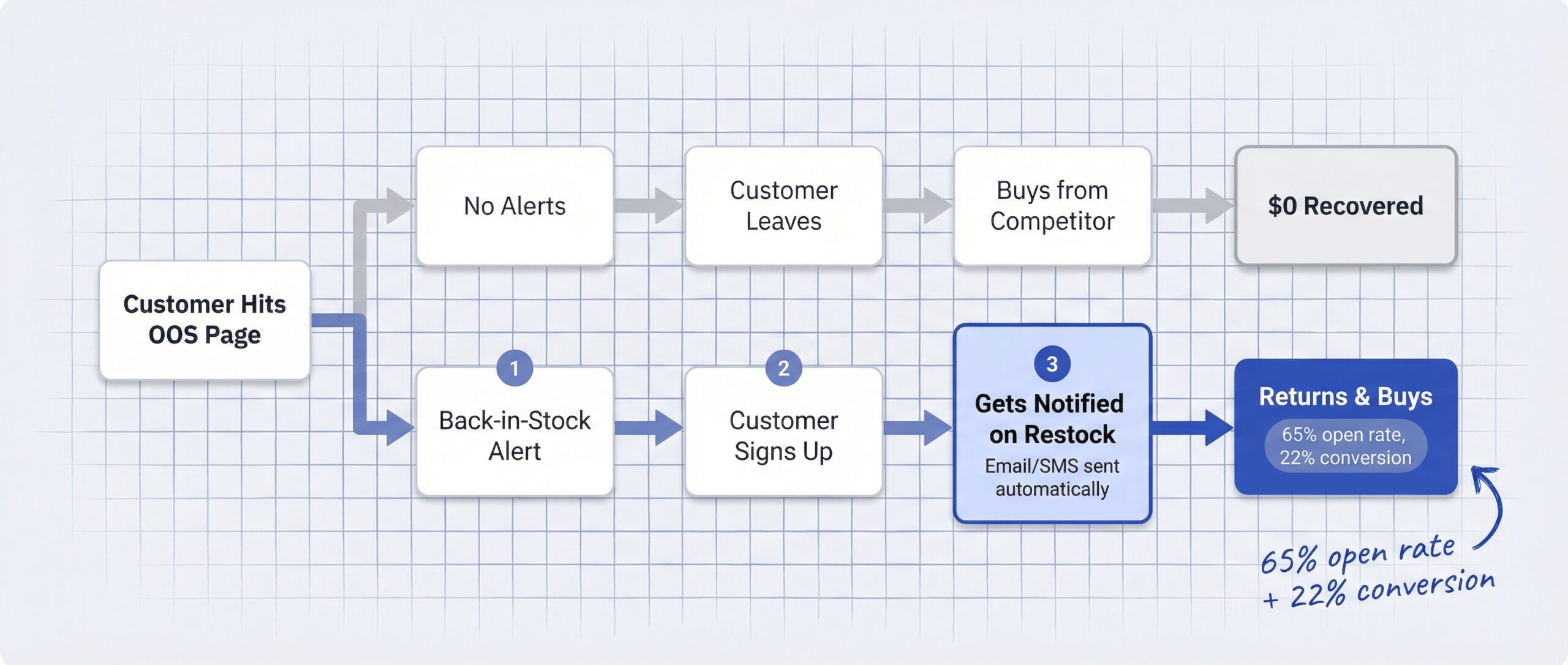
Automated back-in-stock notifications are the single most effective way to recover revenue from stockouts. Instead of losing customers permanently, you capture their intent and bring them back when you restock.
The numbers back this up convincingly. Back-in-stock alert emails average a 65% open rate (Barilliance, 2025). Compare that to the typical ecommerce email open rate of 15-20%, and you see why these alerts are so effective.
Industry benchmarks show that restock notification emails achieve a 22% conversion rate, meaning roughly 1 in 5 customers who receive a back-in-stock alert actually completes a purchase. That’s dramatically higher than any other email marketing category.
A back-in-stock notification app like StoreBeep automates this entire workflow. You capture demand, send branded alerts from your own domain, and track exactly how much revenue each notification recovers.
| Recovery Approach | Open Rate | Conversion Rate | Effort Required |
|---|---|---|---|
| Automated back-in-stock alerts | 65% | ~22% | Set up once, runs automatically |
| Manual email follow-ups | 30-40% | 8-12% | High, requires tracking each product |
| Social media announcements | 5-10% reach | 1-3% | Medium, easy to miss timing |
| No action (hope they return) | N/A | ~2% | None, but revenue stays lost |
The difference between doing nothing and setting up automated alerts is enormous. You’re looking at recovering 20%+ of stockout losses versus losing nearly all of it.
Beyond recovering lost sales, here’s how to reduce your stockout exposure in the first place.
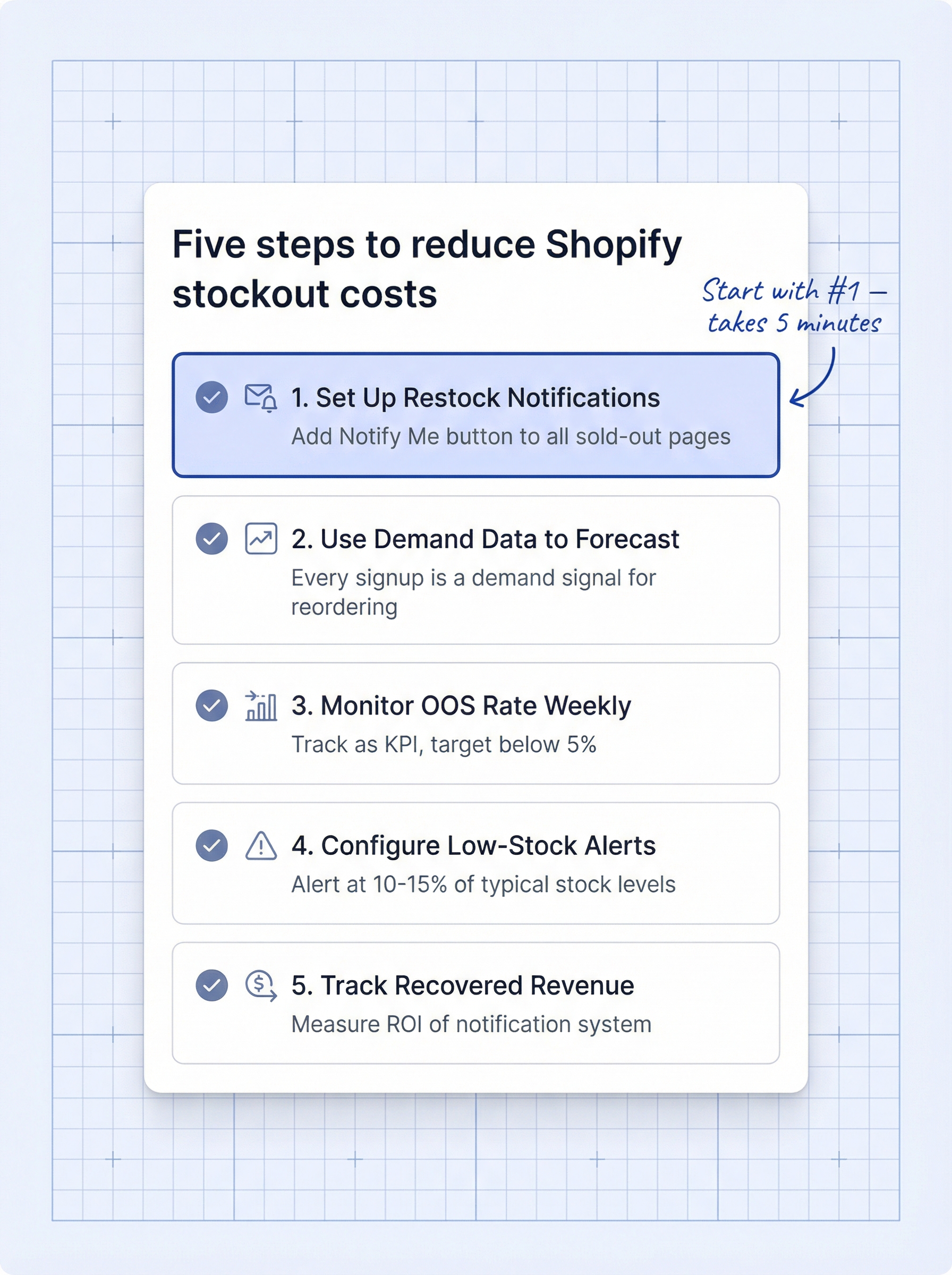
This is step one. If you don’t have a “Notify Me” button on your out-of-stock product pages, you’re letting every visitor walk away with no way to bring them back. The StoreBeep restock notification app adds this automatically to every sold-out product in your store.
Every “Notify Me” signup is a demand signal. If 200 people sign up for a restock alert on one product and 5 sign up for another, you know exactly which product to reorder first. This demand intelligence helps you allocate purchasing budgets where they’ll generate the most revenue.
Track your OOS rate as a KPI. If you’re above the 8% industry average, you have a clear optimization target. Even reducing from 8% to 5% can translate to significant monthly revenue recovery.
Don’t wait until inventory hits zero. Set up alerts at 10-15% of typical stock levels so you can reorder before a stockout happens. Prevention is always cheaper than recovery.
Use purchase tracking to see exactly how many restock alert recipients actually buy. This gives you a clear ROI number for your notification system and helps justify inventory investments to stakeholders.
If you’re looking for a deeper dive into how notification systems work on Shopify, our guide on how Shopify notification systems actually recover revenue breaks down every channel and strategy.
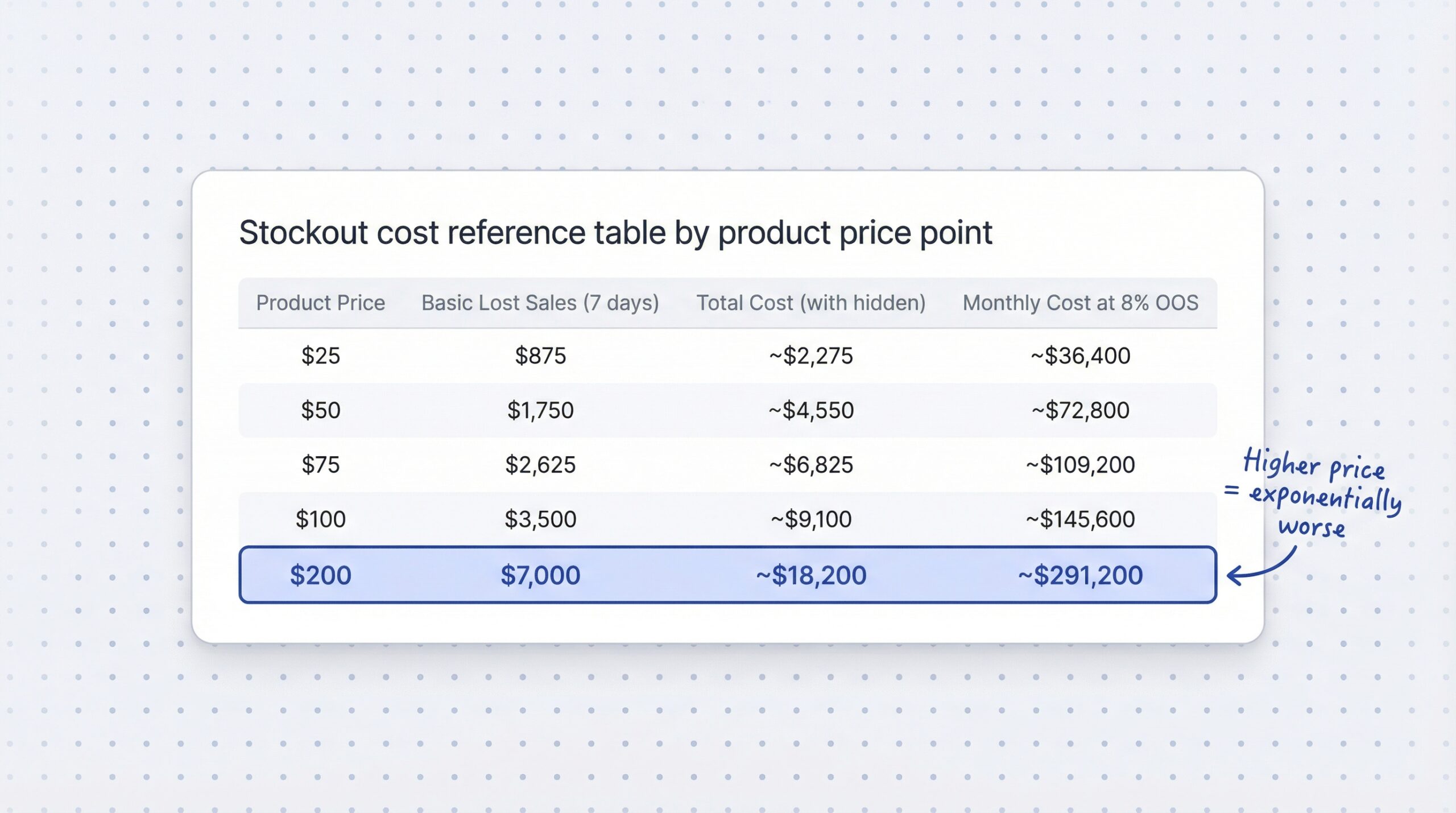
Use this table to quickly estimate your stockout cost based on your product price point. Assumes 5 units/day demand and a 7-day stockout.
| Product Price | Basic Lost Sales (7 days) | Estimated Total Cost (with hidden) | Monthly Cost at 8% OOS Rate |
|---|---|---|---|
| $25 | $875 | ~$2,275 | ~$36,400 |
| $50 | $1,750 | ~$4,550 | ~$72,800 |
| $75 | $2,625 | ~$6,825 | ~$109,200 |
| $100 | $3,500 | ~$9,100 | ~$145,600 |
| $200 | $7,000 | ~$18,200 | ~$291,200 |
Total cost estimated at 2.6x basic lost sales (based on hidden cost multiplier from worked example). Monthly cost assumes 16 products OOS at 8% rate across 200 SKUs.
The pattern is clear: the higher your average product price and the more products you carry, the more devastating stockouts become.
The true ecommerce stockout cost is far more than the sales you see missing from your dashboard. The hidden costs, customer churn, negative reviews, wasted ad spend, and SEO damage, typically multiply the face-value loss by 2-3x.
Here’s what to remember:
The cheapest stockout is the one you recover from. Setting up automated restock notifications takes minutes and immediately starts capturing demand you’d otherwise lose permanently.
If you’re ready to stop losing revenue to empty product pages, StoreBeep’s back-in-stock alerts give your customers a way to come back and buy when you restock. Set it up once, and let it recover sales automatically.
For more Shopify growth strategies and inventory insights, explore our latest guides.
A stockout cost (also known as the cost of being out of stock) is the total revenue lost when a product is unavailable for purchase, including the immediate lost sale plus hidden costs like customer churn, negative reviews, and wasted advertising spend. For most ecommerce stores, the total stockout cost is 2-3x higher than the obvious lost sales figure.
Multiply the number of days out of stock by your average daily unit sales and product price to get the basic cost. Then add hidden costs: cross-sell losses (20-35% of basic cost) and customer lifetime value erosion (affected customers x churn rate x CLV).
The average ecommerce out-of-stock rate is approximately 8%, meaning roughly 1 in 12 products in a typical online catalog is unavailable at any given time. Stores with strong inventory management typically maintain rates below 5%.
Stockouts cost global retailers over $1.2 trillion annually according to IHL Group research. In North America alone, stockout-related losses exceed $144 billion per year.
69% of shoppers leave for a competitor, 32% switch brands permanently, and industry research shows 91% won’t wait for a restock. Only about 9% of customers will check back later to see if the product has returned.
Yes. Back-in-stock alert emails average a 65% open rate and approximately 22% conversion rate, making them the most effective method to recover revenue from stockouts. Automated alerts outperform manual follow-ups by 2-3x on every metric.
The average stockout lasts approximately 35 days in ecommerce. Even short stockouts of 3-5 days cause significant revenue loss because most customers won’t wait and immediately purchase from competitors.
Stockouts significantly damage loyalty, 60% of customers are more likely to leave a negative review after a stockout experience, and 32% switch to a competing brand permanently. The cumulative effect erodes your customer base over time.
Keep reading