February 10, 2026 · Gaurav Radadiya
A Shopify restock notification app automatically alerts customers when out-of-stock products become available again, recovering sales that would otherwise be lost. A restock notification is an automated message sent to a customer when a previously out-of-stock product becomes available, typically delivered through email, SMS, WhatsApp, or web push. With retailers losing $984 billion annually to stockouts worldwide and 69% of online shoppers abandoning their purchase to shop with a competitor when items are unavailable (Opensend stockout research, 2025), back in stock alerts on Shopify are one of the highest-ROI tools a store owner can install.
This article breaks down how Shopify notification systems work, compares the performance of every alert channel with real conversion data, and shows you how to calculate the revenue you can recover. Whether you are evaluating your first restock alerts setup or trying to figure out which channel converts best, you will walk away with the numbers and framework to make a confident decision.
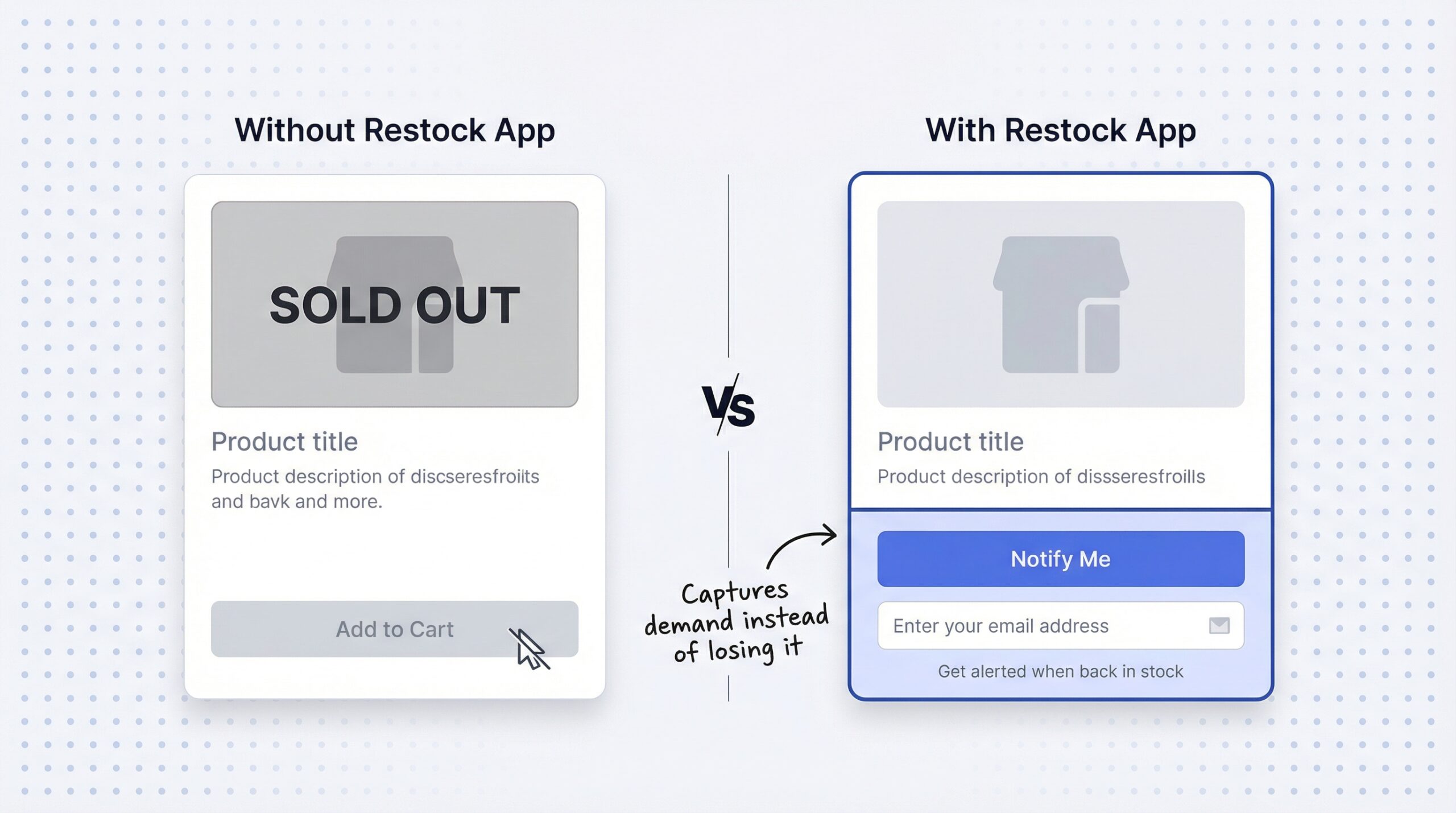
When a Shopify product goes out of stock, the default behavior is a “Sold Out” label with no way to capture customer demand. Every visit to that page becomes a lost opportunity. The customer sees a dead end, and Shopify gives them no built-in option to leave their email or get notified when the product returns.
That leaves three outcomes for the customer: they bounce and forget about it, they find the same product from a competitor, or they join a waitlist (if you have one set up). The data is clear on which outcome wins. 69% of online shoppers leave for a competitor when items are out of stock. Even worse, 42% of first-time shoppers are unlikely to return after a stockout experience.
Here is what the math looks like in practice. If a sold-out product page gets 100 visits per month and 69% of those visitors leave for a competitor, that is 69 lost customers per product, per month. Multiply that across five or ten popular products and the losses stack up fast. Demand capture is the process of collecting customer contact information on out-of-stock product pages so merchants can re-engage those shoppers when inventory returns. Without it, you are watching revenue walk out the door.
Shopify’s native platform handles order notifications, shipping confirmations, and abandoned cart emails. But it does not offer any built-in way to capture customer emails on out-of-stock pages or send automatic restock alerts. For that, you need a third-party app.
| Capability | Shopify native | Third-party app (like StoreBeep) |
|---|---|---|
| “Sold Out” label on product page | Yes | Yes (replaced with “Notify Me”) |
| Customer email capture on OOS page | No | Yes |
| Automatic restock email to customers | No | Yes |
| SMS/WhatsApp restock alerts | No | Yes (select apps) |
| Demand analytics (waitlist data) | No | Yes |
| Purchase tracking from alerts | No | Yes |
| Custom sender domain | N/A | Yes (select apps) |
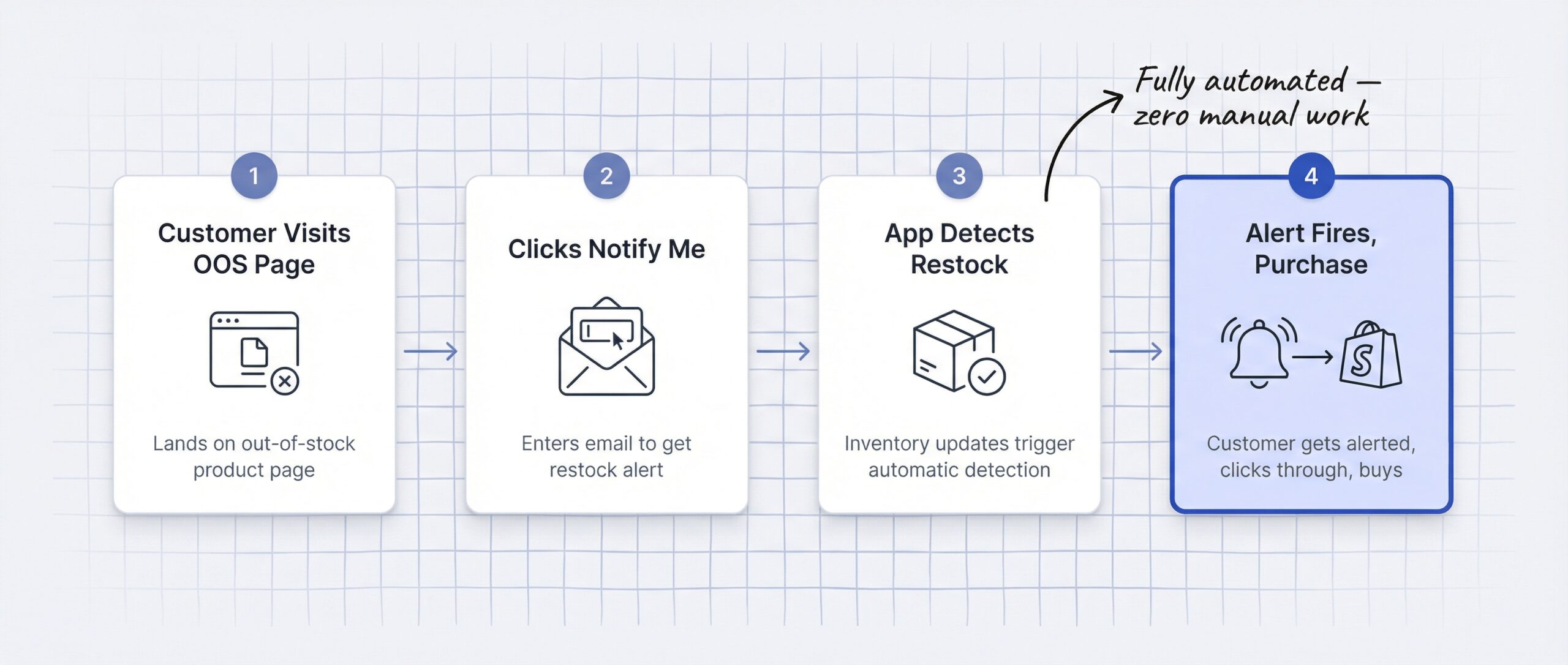
Back-in-stock notifications on Shopify work in four steps: a customer registers interest on a sold-out product page, the app stores their contact information, inventory updates trigger an automatic alert, and the customer clicks through to purchase.
A back-in-stock alert is a triggered message, usually an email, that notifies a customer that a specific product they expressed interest in has been restocked and is available for purchase. Here is how the four-step process breaks down:
Step 1: Customer visits out-of-stock product page and clicks “Notify Me.” A “Notify Me” button is a signup form that appears on out-of-stock Shopify product pages, allowing customers to register their email or phone number to receive an automatic alert when the product restocks. Instead of seeing a dead-end “Sold Out” label, the customer sees an opportunity to stay in the loop.
Step 2: App collects and stores contact information. The customer enters their email address, and depending on the app, can also opt in for SMS or WhatsApp notifications. This data gets stored securely within the app and is available for demand analysis.
Step 3: Merchant restocks product and the app detects the inventory change automatically. No manual intervention needed. The moment inventory levels update in Shopify, the app recognizes the change and queues the alert.
Step 4: Alert fires via chosen channel and the customer clicks through to purchase. The notification lands in the customer’s inbox (or phone), with a direct link back to the product page. This automated loop means merchants recover sales without any manual follow-up.
Apps like StoreBeep restock notification app plug into this flow by detecting Shopify inventory changes and firing alerts automatically. The entire process runs in the background while you focus on running your store.
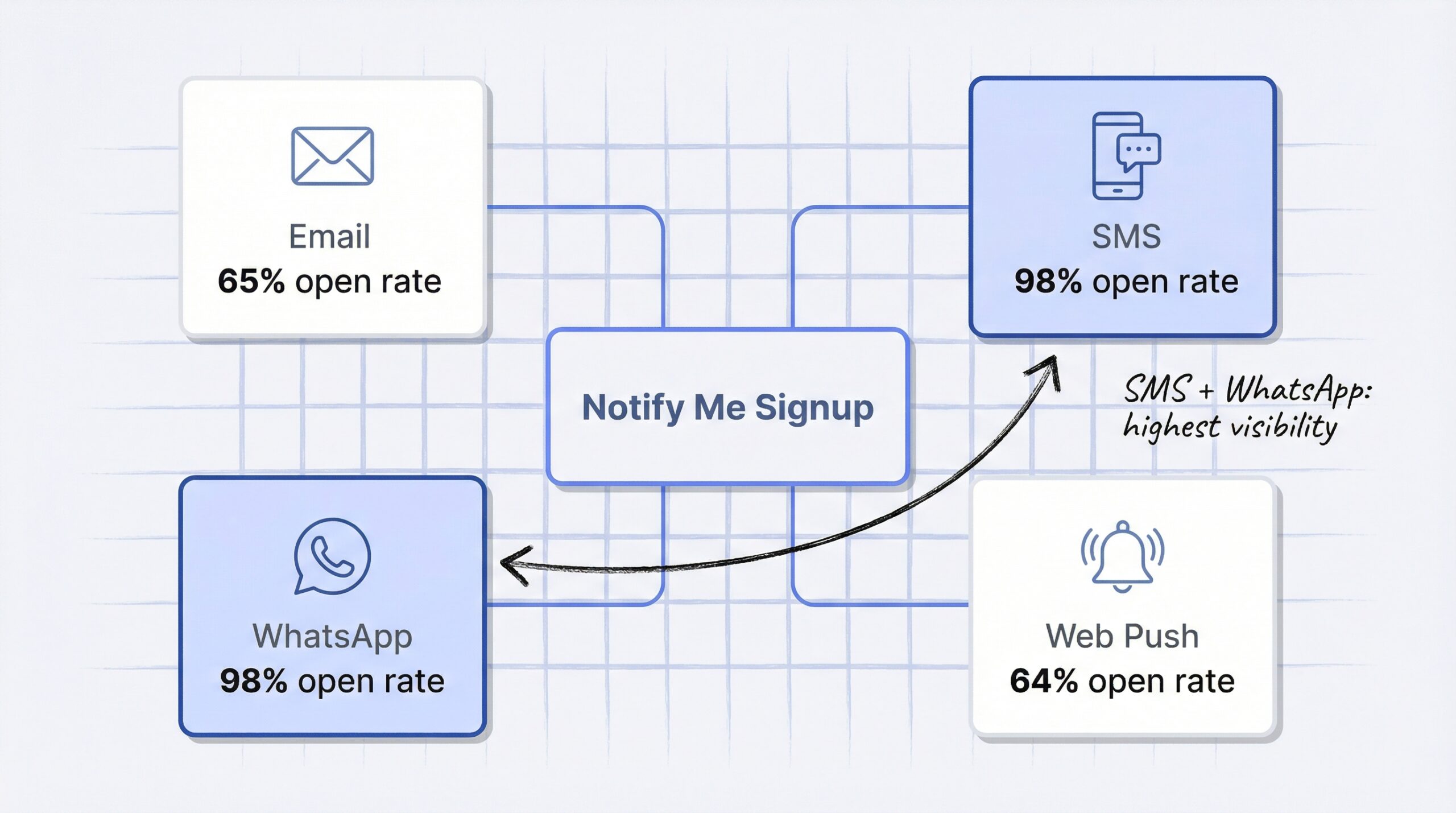
The four main notification channels for Shopify restock alerts are email, SMS, WhatsApp, and web push. Each has different open rates, click-through rates, and cost structures. Multi-channel notification is the practice of offering customers a choice of alert channels when they sign up for restock updates on a single product. Choosing the right mix depends on your audience, budget, and where your customers prefer to be reached.
Email is the most reliable channel for back-in-stock alerts, with a 65.32% open rate and 5.34-6.41% conversion rate, the highest of any automated email type (Omnisend email marketing benchmarks, 2025). These alerts also achieve a 24.49% click-through rate, far above the industry average for marketing emails.
Back-in-stock emails see open rates 3x higher than regular marketing emails because they solve a specific problem the customer already expressed. In best-case implementations, these alerts reach a 22.45% conversion rate.
Automated emails like restock alerts account for only 2-3% of total send volume but drive 37-40% of all email revenue. That is a massive return from a tiny slice of your email program.
SMS restock alerts achieve a 98% open rate and generate $71 in ROI for every $1 spent, making them the highest-visibility notification channel (OptiMonk SMS marketing data, 2025). Click-through rates for e-commerce SMS range from 19-36%.
The immediacy of SMS makes it especially effective for time-sensitive restocks. When a limited-run product comes back and sells out quickly, an SMS alert gives subscribers a head start that email cannot match.
WhatsApp restock alerts deliver the highest engagement of any channel, with a 98% open rate and 45-60% click-through rate (FlowCart WhatsApp vs email comparison, 2025). The rich media support and conversational format make WhatsApp alerts feel more like a personal message than a marketing notification.
WhatsApp is particularly powerful for stores selling internationally. In markets across Europe, Asia, and Latin America, WhatsApp is the primary messaging platform and customers expect to interact with brands there.
Web push notifications require no personal data to subscribe, with a 68% opt-in rate and 64.2% automated open rate, making them the lowest-friction restock alert option (MobiLoud push notification benchmarks, 2025). Click-through rates land between 3-7% for e-commerce push notifications.
Contextual push notifications have a 14.4% open rate compared to just 4.19% for generic campaigns. Since restock alerts are inherently contextual (the customer asked to be notified), they perform well above average push benchmarks.
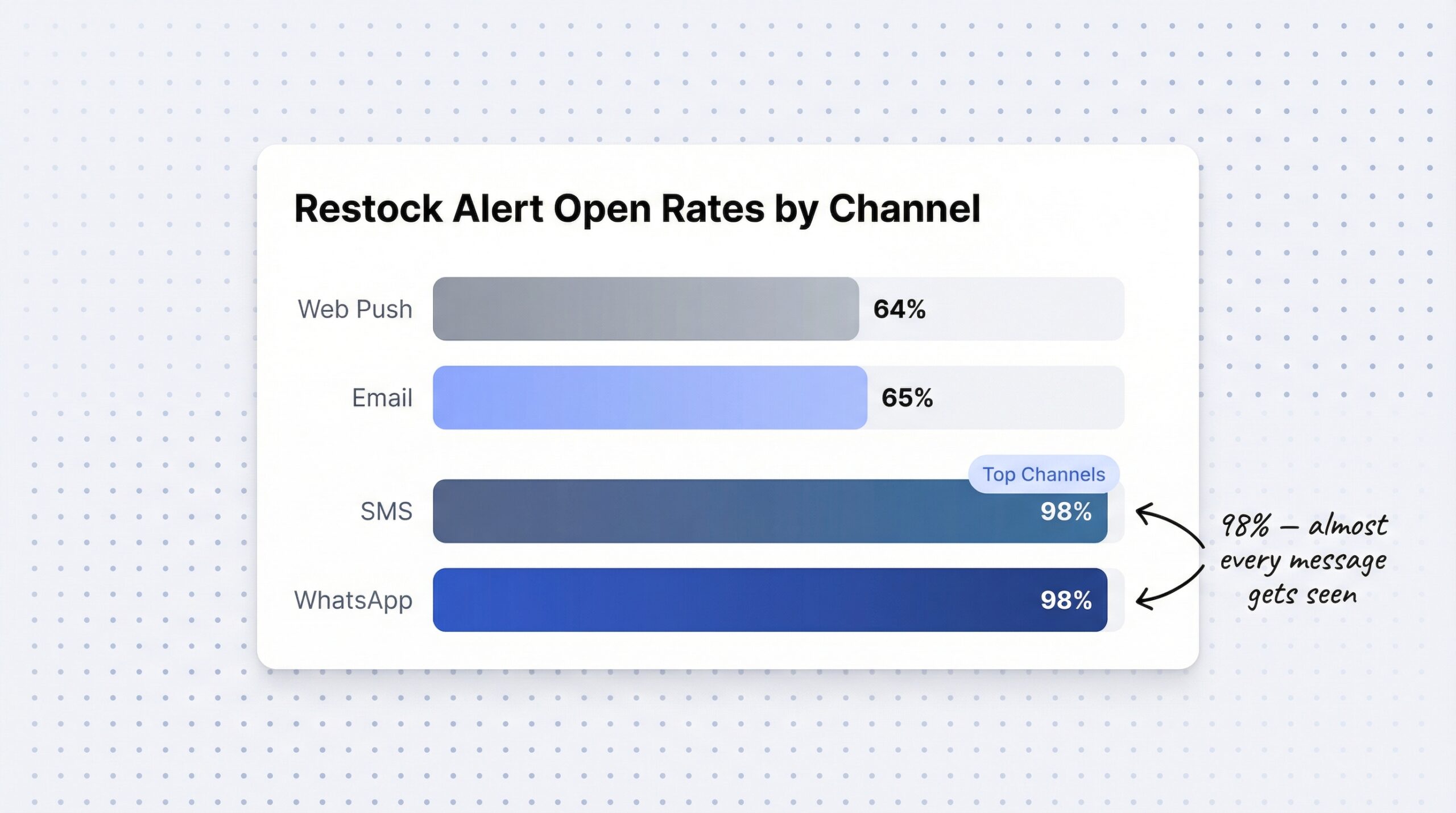
The following table compares all four Shopify restock notification channels across open rate, click-through rate, conversion potential, cost per message, and ideal use case.
| Channel | Open rate | CTR | Conversion rate | Cost per message | Setup difficulty | Best for |
|---|---|---|---|---|---|---|
| 65% | 24.5% | 5-6% | Free (most apps) | Easy | All stores (start here) | |
| SMS | 98% | 19-36% | High (varies) | $0.01-0.05/msg | Medium | High-demand drops, urgency |
| 98% | 45-60% | High (varies) | $0.03-0.08/msg | Hard | International, high-touch | |
| Web push | 64% | 3-7% | Low-medium | Free | Easy | Supplementary, anonymous visitors |
For most Shopify stores, email is the best starting channel because it has the highest conversion rate and zero per-message cost. Adding SMS or WhatsApp as a second channel captures customers who prefer mobile messaging and increases overall recovery rates.
The real power is in letting customers choose. When your “Notify Me” form offers email, SMS, and WhatsApp as options, you meet customers on the channel they are most likely to engage with. That is how you maximize signups and conversions across the board.
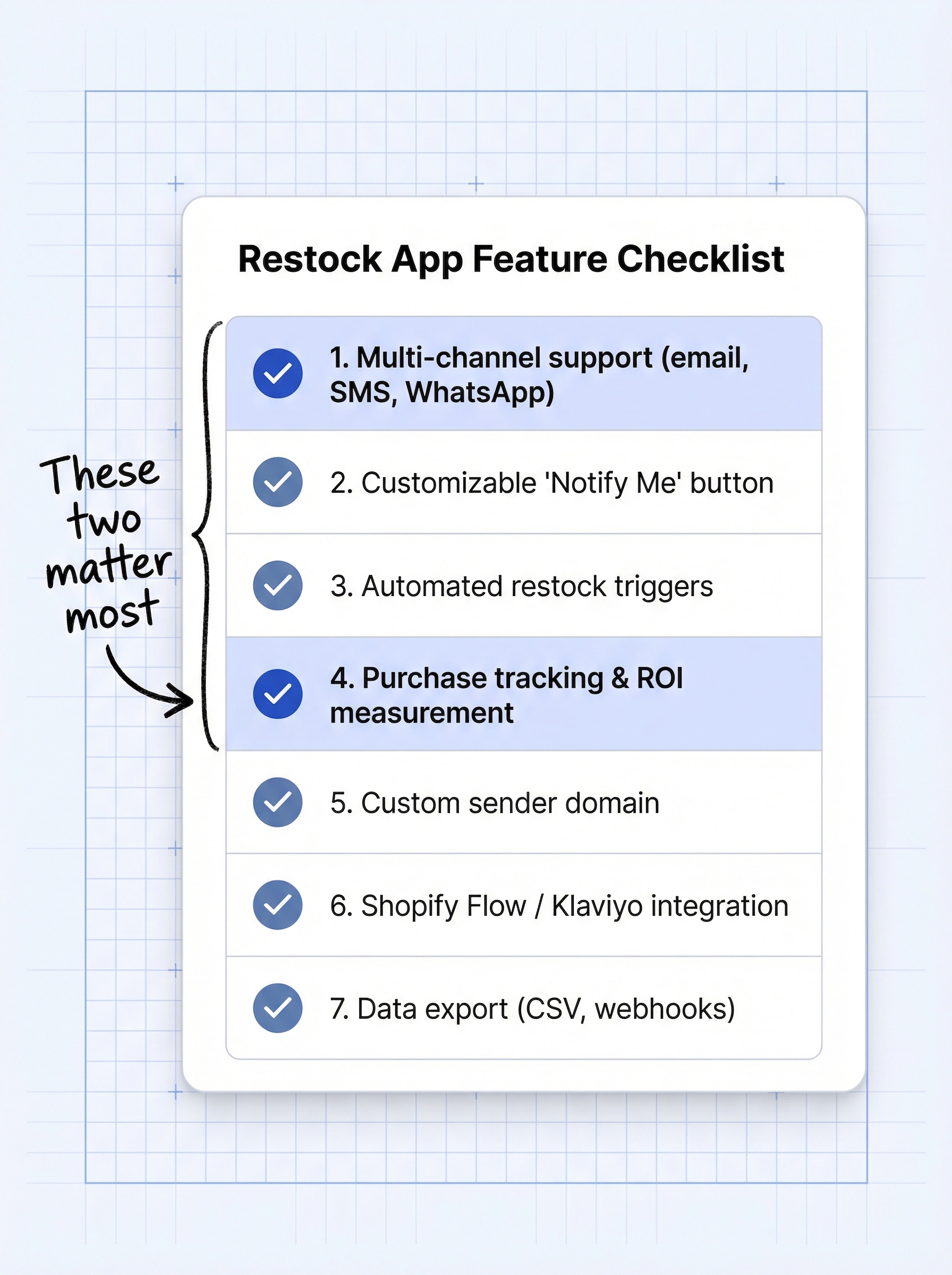
The most important features in a Shopify restock notification app are multi-channel support, automated triggers, a customizable “Notify Me” button, purchase tracking, and a custom sender domain. Here is the full checklist:
| Feature | Why it matters |
|---|---|
| Multi-channel support | Reaches customers on their preferred channel |
| Customizable “Notify Me” button | Matches your brand and builds trust |
| Automated triggers | No manual work per restock event |
| Purchase tracking | Measures real revenue recovery ROI |
| Custom sender domain | Improves email deliverability and brand recognition |
| Shopify Flow / Klaviyo integration | Connects to existing marketing workflows |
| Data export (CSV, webhooks) | Enables demand forecasting and external analysis |
A custom sender domain lets merchants send restock alert emails from their own brand address (like [email protected]) instead of a generic third-party address, improving email deliverability and brand recognition. Personalized emails see a 39% higher open rate than generic alerts, so brand recognition in the sender field matters more than most store owners realize.
StoreBeep back-in-stock alerts covers all seven criteria starting on its free plan, with custom sender domains and WhatsApp collection available on the Pro plan at $9.99/month. The app also includes purchase tracking so you can see exactly how much revenue your restock alerts recover.
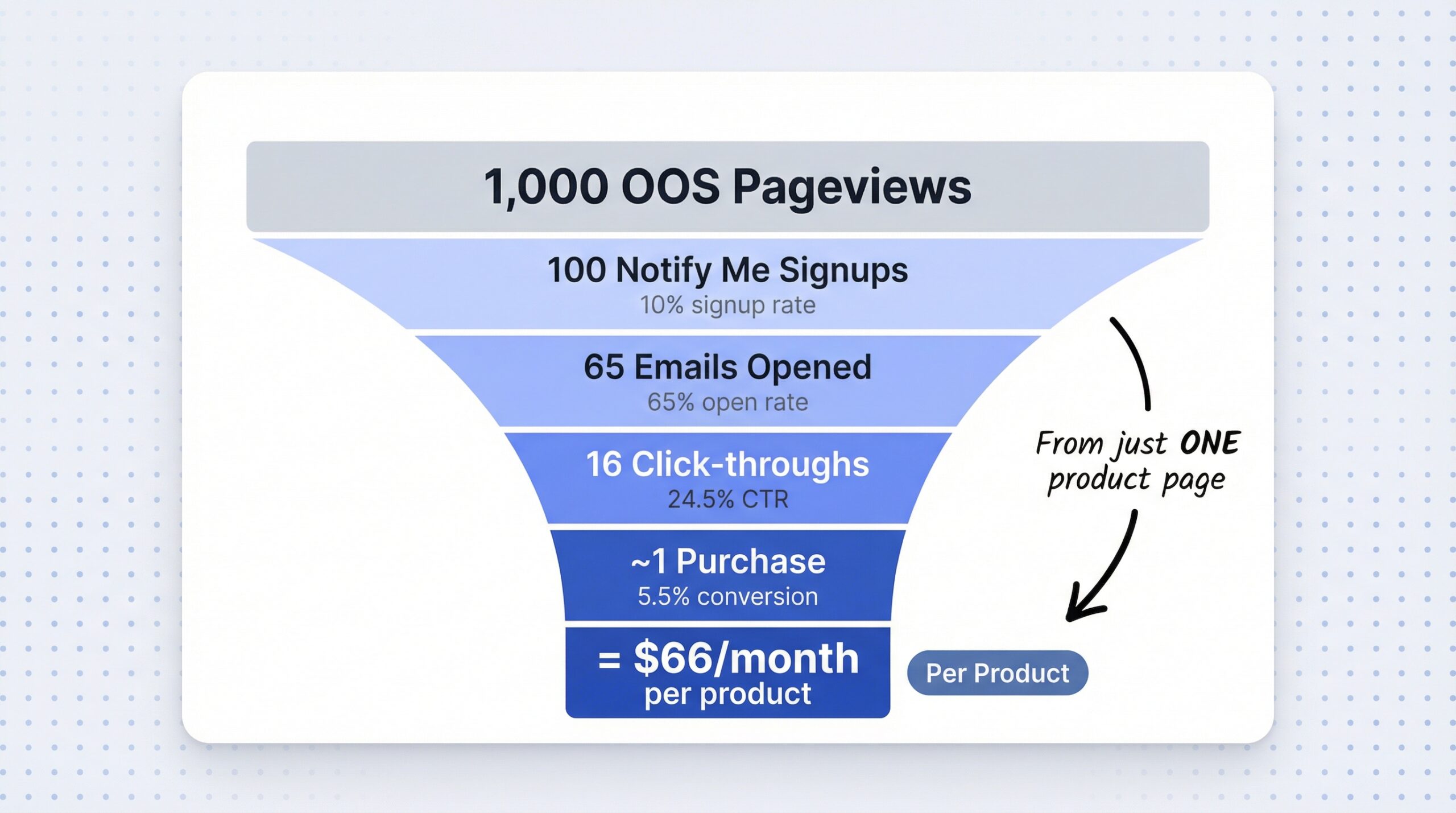
You can estimate your revenue recovery potential by multiplying your monthly out-of-stock pageviews by signup rate, notification open rate, click-through rate, conversion rate, and average order value.
The formula:
Monthly OOS Pageviews x Signup Rate x Open Rate x CTR x Conversion Rate x AOV = Estimated Monthly Revenue Recovery
Here is a worked example with realistic numbers:
| Variable | Value | Source |
|---|---|---|
| Monthly OOS pageviews | 1,000 | Example |
| “Notify Me” signup rate | 10% | Industry average |
| Email open rate | 65% | Industry benchmark |
| Click-through rate | 24.5% | Industry benchmark |
| Conversion rate | 5.5% | Industry benchmark |
| Average order value | $75 | Example |
| Estimated monthly recovery | ~$66 per product | Calculated |
For a store with five popular products that frequently go out of stock, that is roughly $330 in recovered revenue per month from a single automated email. Merchants using back-in-stock notifications see 5-15% increased revenue from recovered lost sales.
The ROI math is straightforward. If your notification app is free or costs $10/month and recovers even a few sales, it pays for itself immediately. The cost of not having restock alerts is far higher than the cost of any app on the market.
We will dig deeper into stockout costs and the true financial impact on Shopify stores in an upcoming article on the real cost of stockouts. For now, the back-of-napkin math makes the case clearly.
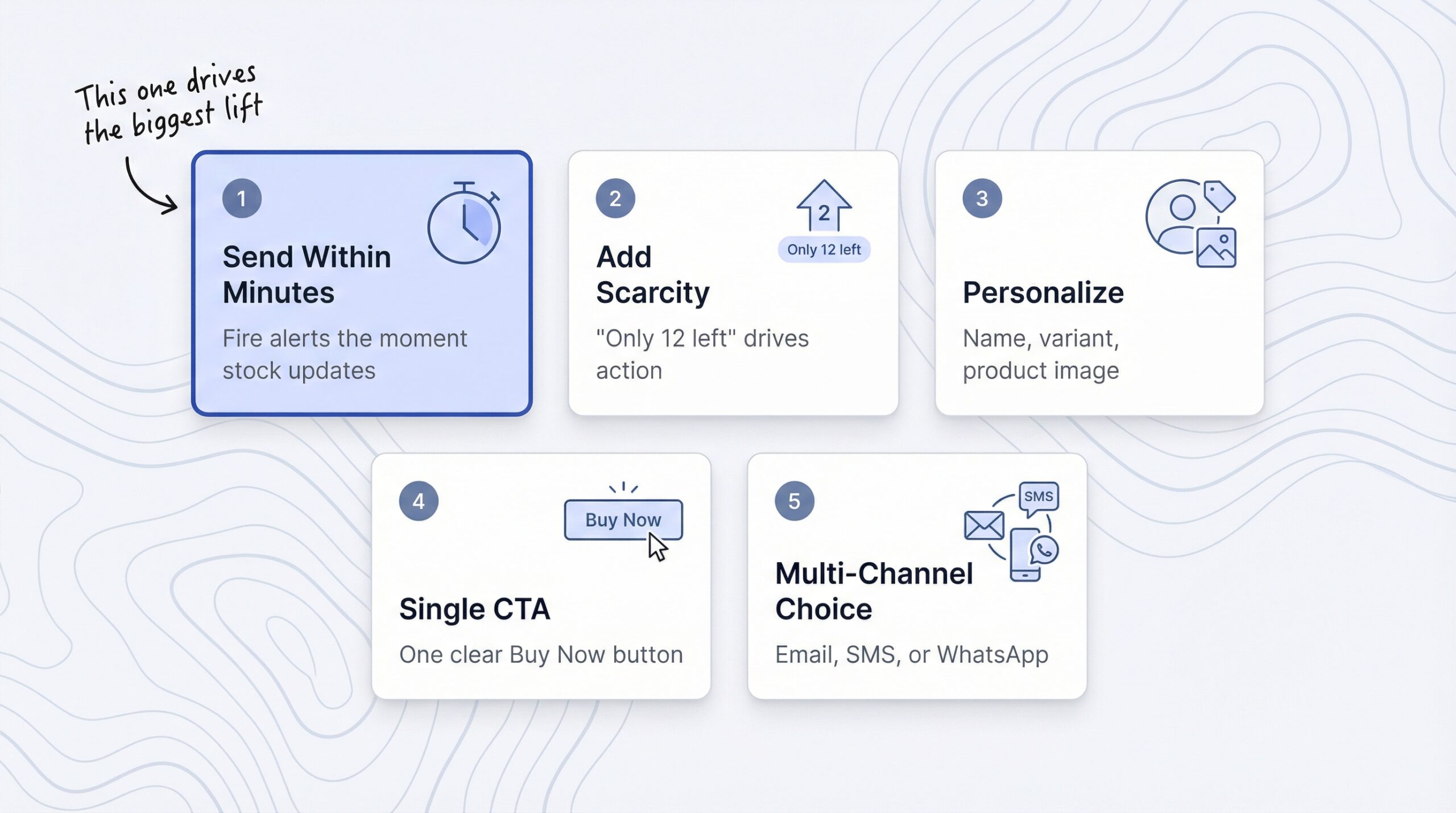
The five most effective practices for maximizing conversions from back-in-stock alerts are immediate sending, scarcity messaging, personalization, single CTA design, and multi-channel choice.
Restock alerts sent within minutes of inventory updates outperform delayed sends because the customer’s purchase intent is strongest immediately after signup. The gap between “I want this” and “I forgot about it” closes fast. Automated triggers that fire the moment Shopify registers new inventory keep that purchase intent alive.
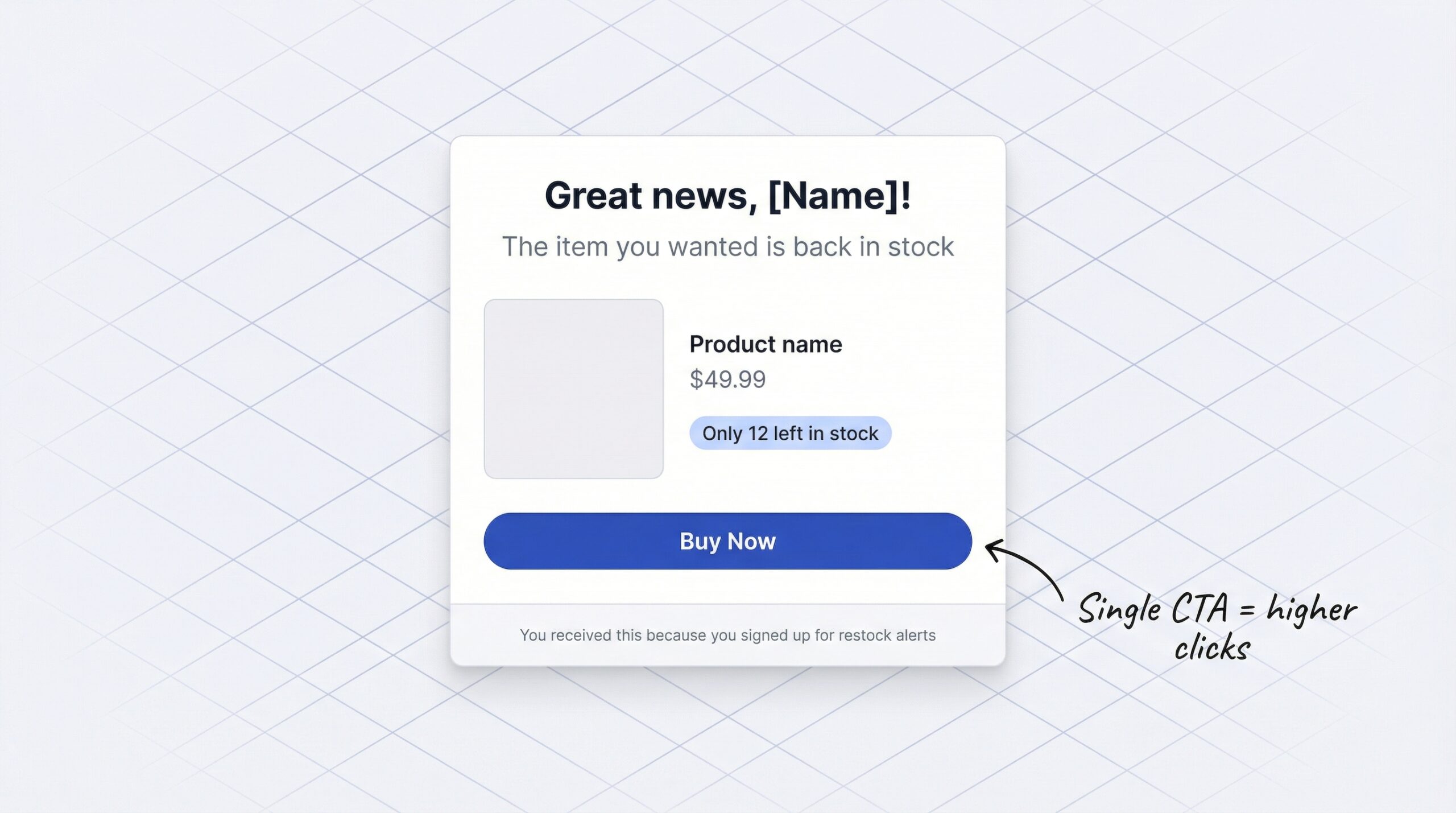
Including real-time inventory counts in restock alerts creates urgency. Customers who see limited availability purchase faster because they understand the product sold out once and could sell out again. A simple line like “Back in stock, only 12 left” gives your alert a conversion edge over a plain “This item is available again.”
Personalized emails see a 39% higher open rate than generic alerts. Include the customer’s name, the specific variant they wanted (size, color, style), and a product image. The more the email feels like it was written for them, the more likely they are to click through.
Each restock alert should contain a single, prominent call-to-action button that links directly to the product page. Multiple CTAs dilute click-through. Your customer signed up for one reason: to buy that product. Make the path from alert to checkout as short and obvious as possible.
Offering email, SMS, and WhatsApp as signup options during “Notify Me” registration increases total signups and lets customers receive alerts on their preferred channel. Some customers check email constantly. Others live on WhatsApp. Giving them the choice means more signups and higher engagement when the alert lands.
We will cover restock email design in depth in an upcoming guide on automated restock email templates, including subject line formulas and layout patterns that convert.
What is a restock notification on Shopify?
A restock notification is an automated alert sent to customers when a previously sold-out Shopify product becomes available again. Customers sign up through a “Notify Me” button on the product page, and the alert is sent automatically via email, SMS, or WhatsApp when you restock.
How do I add a “Notify Me” button to my Shopify store?
Install a back-in-stock notification app like StoreBeep from the Shopify App Store, and the “Notify Me” button appears automatically on out-of-stock product pages. Most apps require no code changes and can be customized to match your store theme in minutes.
Do back-in-stock alerts increase sales?
Yes. Back-in-stock emails achieve a 65% open rate and 5-6% conversion rate, the highest of any automated email type. Merchants using restock notifications typically see 5-15% increased revenue from recovered lost sales.
What is the best notification channel for restock alerts?
Email is the best starting channel because it has the highest conversion rate (5-6%) and zero per-message cost. For higher visibility, SMS and WhatsApp both achieve 98% open rates, though they carry per-message costs of $0.01-0.08.
Does Shopify have built-in back-in-stock notifications?
No. Shopify shows a “Sold Out” label on out-of-stock products but does not offer any built-in way to capture customer emails or send automatic restock alerts. You need a third-party app to add this capability.
Can I send restock alerts through WhatsApp on Shopify?
Yes, select Shopify apps support WhatsApp restock alerts with 98% open rates and 45-60% click-through rates. You need an app that collects WhatsApp opt-ins during the “Notify Me” signup process.
How much do back-in-stock notification apps cost on Shopify?
Most back-in-stock apps offer a free plan with limited email sends (typically 50-100/month) and paid plans ranging from $5-30/month for higher volumes. StoreBeep starts free with 50 emails/month, with Pro plans at $9.99/month for 1,000 emails and custom sender domains.
How much revenue can I recover with restock notifications?
Merchants typically recover 5-15% of revenue lost to stockouts. You can estimate your recovery by multiplying monthly out-of-stock pageviews by your signup rate, email open rate, click-through rate, conversion rate, and average order value.
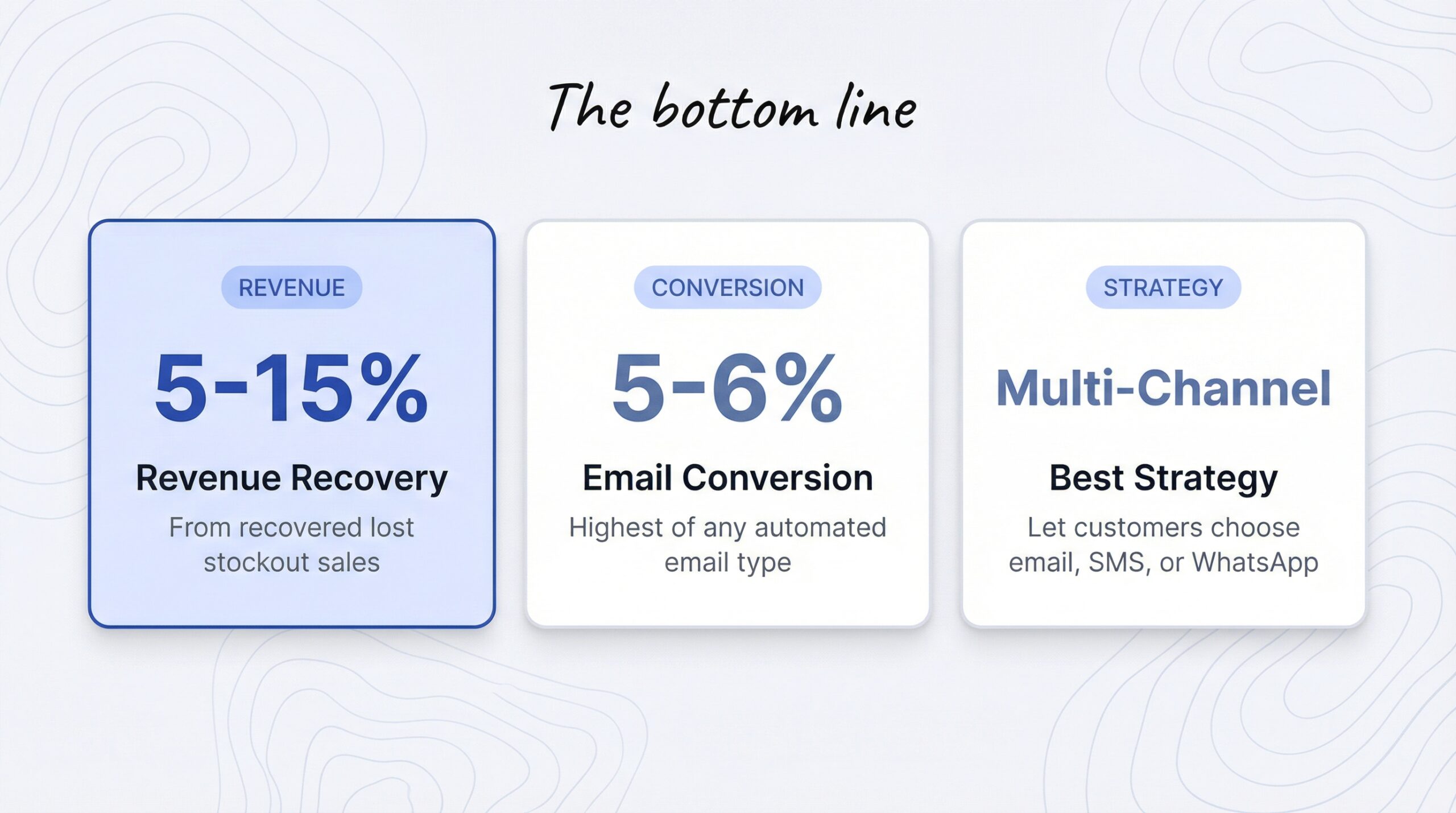
Stockouts are part of running a Shopify store. But lost revenue does not have to be. The shift from a “Sold Out” dead end to a “Notify Me” conversion funnel is one of the simplest, highest-ROI changes you can make to your store.
Here is what the data shows:
In 2026, with 51% of products experiencing at least one stockout per year and average stockout durations stretching 35 days, you cannot afford to leave demand on the table. Every day without a restock alert system is a day you are losing customers to competitors who have one.
StoreBeep’s multi-channel restock alerts let you set up notifications on Shopify in under five minutes, starting free. Install the app, customize your “Notify Me” button, and start capturing demand on your out-of-stock pages today.
For more tips on growing your Shopify store, visit the StoreBeep blog for Shopify merchants. And stay tuned for our upcoming deep dive into the real cost of stockouts for Shopify merchants, plus a practical guide to automated restock email templates that convert.
Keep reading